介绍

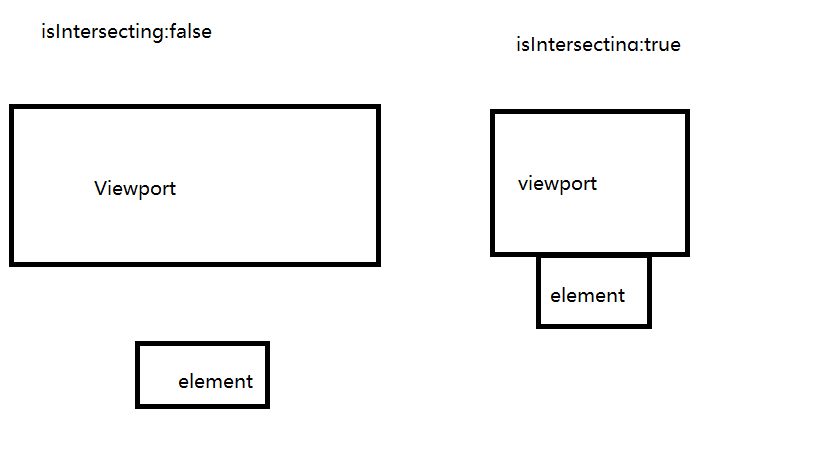
这是绝大部份现代浏览器都支持的API,来监听滚动事件。 提供了一种创建IntersectionObserver 对象的方法,对象用于监测目标元素与视窗(viewport)的交叉状态,并在交叉状态变化时执行回调函数,回调函数可以接收到元素与视窗交叉的具体数据。

大概如下图所示 Pasted image 20240314105128.png

他不会想滚动一样,随着元素的滚动而触发。 而是当元素与视口相交才会触发,性能消耗低。

IntersectionObserver构造函数接收两个参数:

  1. callback :当元素可见比例达到指定阈值后触发的函数
  2. options:配置对象(可选)

IntersectionObserver的实例对象会携带四个方法,

  • observe,开始监听目标元素。

  • unobserve:停止监听目标元素

  • disconnect:关闭观察器

  • takeRecords,返回所有观察目标的IntersectionObserverEntry对象数组。

回调函数的构造参数

  • entries:IntersectionObserverEntry数组,没想都描述了目标元素与root的交叉状态
  • observer:被调用的IntersectionObserver实例

配置项的参数

  • root:所监听对象的具体祖先元素,默认使用顶级文档的视窗

  • rootMargin:计算交叉时,到root边界盒的矩形偏移量,默认值为“0px 0px 0px 0px”

  • threshold:一个包含阈值的列表,按升序排列

应用之懒加载

<!DOCTYPE html>

<html lang="en">
<head>
  <meta charset="UTF-8">
  <meta name="viewport" content="width=device-width, initial-scale=1.0">
  <title>Document</title>
  <style>
  .skin_img {
    margin-bottom: 20px;
    width: auto;
    height: 500px;
    overflow: hidden;
    position: relative;
  }
  </style>
</head>
<body>
  <div class="skin_img">
    <img
      class="lazyload"
      data-src="//game.gtimg.cn/images/lol/act/img/skinloading/412017.jpg"
      alt="灵魂莲华 锤石"
    />
  </div>
</body>
<script>
  const imgList = [...document.querySelectorAll('img')]

  const observer = new IntersectionObserver((entries) =>{
  entries.forEach(item => {
    // isIntersecting是一个Boolean值,判断目标元素当前是否可见
    if (item.isIntersecting) {
      console.log(item.target.dataset.src)
      item.target.src = item.target.dataset.src
      // 图片加载后即停止监听该元素
      observer.unobserve(item.target)
    }
  })

}, {
  root: document.querySelector('.root')
})

imgList.forEach(img => observer.observe(img))
</script>
</html>

应用之无限滚动

<template>
  <div class="container">
    <div class="list">
      <div v-for="(item, index) in data" :key="index" class="list-item">
        {{ item }}
      </div>
      <div
        v-if="!allDataLoaded"
        ref="observerElement"
        class="observer-element"
      ></div>
    </div>
  </div>
  <div v-show="loading" class="loading">
    <h1>加载中...</h1>
  </div>
</template>

<script setup lang="ts">
import { onMounted, ref } from "vue";
const data = ref<any[]>([]);
const allDataLoaded = ref(false); // 新增变量,用于判断是否所有数据已加载
const observerElement = ref(); // 新增引用,用于观察元素
const loading = ref(false);

onMounted(async () => {
  await loadMore();
  const observer = new IntersectionObserver(
    (entries) => {
      if (entries[0].isIntersecting && !loading.value && !allDataLoaded.value) {
        loadMore();
      }
    },
    {
      root: null,
      rootMargin: "0px",
      threshold: 1.0,
    }
  )
  observer.observe(observerElement.value);
});

const loadMore = async () => {
  if (loading.value) return; // 如果已经在加载,则不再触发
  loading.value = true;
  // 模拟异步加载数据
  setTimeout(() => {
    const newData = new Array(10).fill(0).map((_, i) => data.value.length + i);
    data.value.push(...newData);
    loading.value = false;
    // 如果数据加载完毕,设置allDataLoaded为true
  }, 1000);
};
</script>
<style scoped>
.container {
  height: 600px;
  overflow: auto; /* 添加滚动 */
  width: 300px;
}

.list {
  height: 100%;
  width: 98%;
}
.list-item {
  width: 100%;
  height: 50px;
  border: 1px solid #e01d1d;
}

.observer-element {
  height: 50px; /* 观察元素高度 */
}

.loading {
  position: fixed; /* 固定位置 */
  top: 0; /* 顶部对齐 */
  left: 0; /* 左侧对齐 */
  width: 100%; /* 宽度填满视口 */
  height: 100%; /* 高度填满视口 */
  background-color: rgba(255, 255, 255, 0.8); /* 半透明背景 */
  display: flex; /* 使用flex布局 */
  justify-content: center; /* 水平居中 */
  align-items: center; /* 垂直居中 */
  z-index: 1000; /* 确保在最上层 */
}

</style>

这里是当目标元素进入视口并且当前没有在加载数据时,调用loadMore函数来加载更多数据 讲最后一个列表元素的ref添加到观察者实例进行观察,只有当lastContentRef.current存在时才会进行观察。 当滚动完毕,重新赋值

应用之虚拟滚动

<template>

  <template v-for="(item, idx) in listData" :key="item.id">
    <div class="content-item" :data-index="idx">
      <template v-if="item.visible">
        <!-- 模仿元素内容渲染 -->
        {{ item.value }}
      </template>
    </div>
  </template>
</template>

<script setup lang="ts">
import { onMounted, ref } from "vue";
const listData = ref(
  Array.from({ length: 1000 }, (_, i) => {
    let str = "";
    for (let j = 0; j < Math.random() * 100; j++) str += "你好👋 ";
    return { id: i, value: `${i + str}`, visible: false };
  })
);
onMounted(() => {
  const observer = new IntersectionObserver((entries) => {
    entries.forEach((row) => {
      const index = row.target.dataset.index;
      if (!row.isIntersecting) {
        row.target.style.height = `${row.target.clientHeight}px`;
        listData.value[index].visible = false;
      } else {
        row.target.style.height = "";
        listData.value[index].visible = true;
      }
    });
  });

  document.querySelectorAll(".content-item").forEach((row) => {
    observer.observe(row);
  });
});

</script>


<style scoped>
.content-item {
  height: 100px;
  border: 1px solid #ccc;
  padding: 10px;
  width: 300px;
}

</style>