Vue3 源码学习
整体流程如下,返回阅读
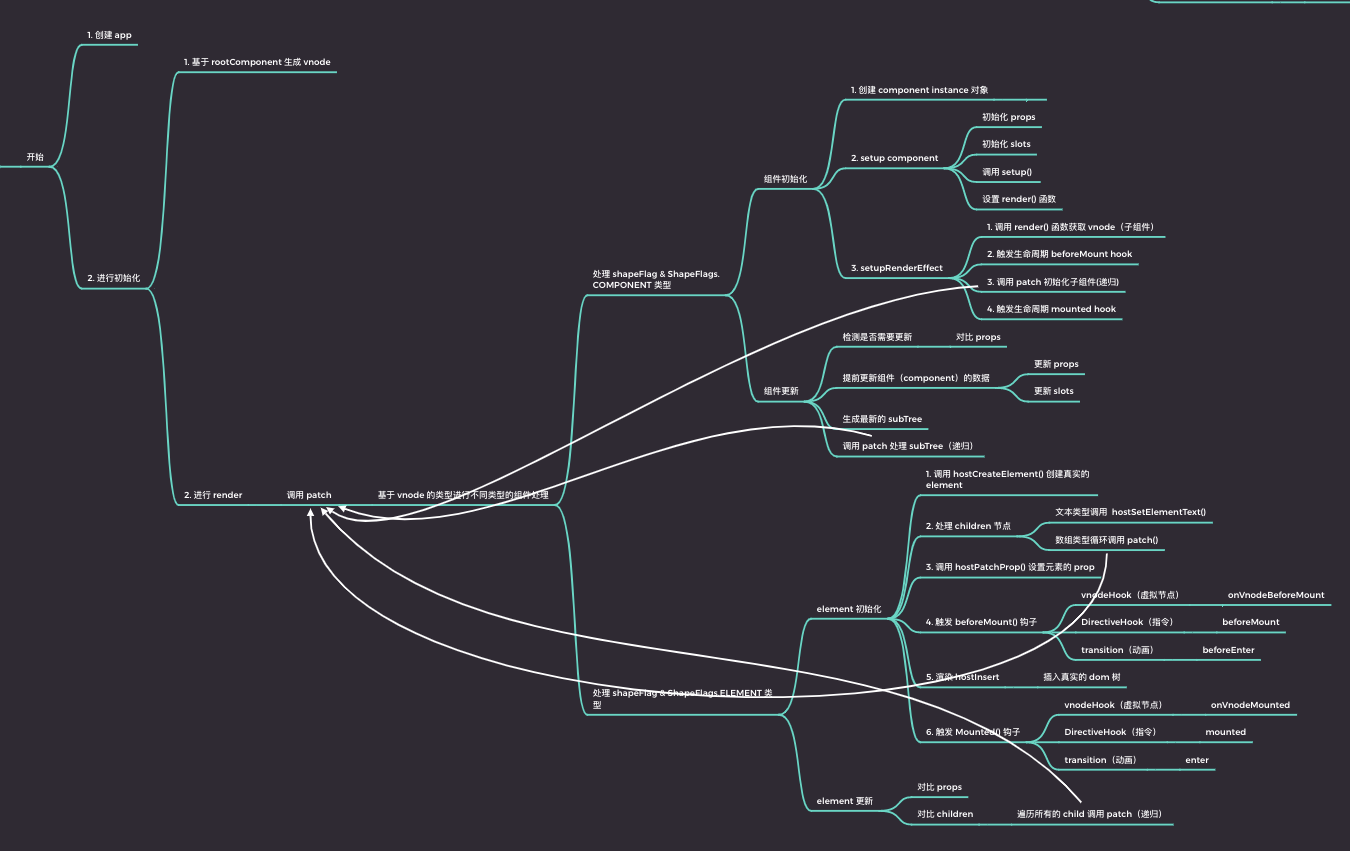
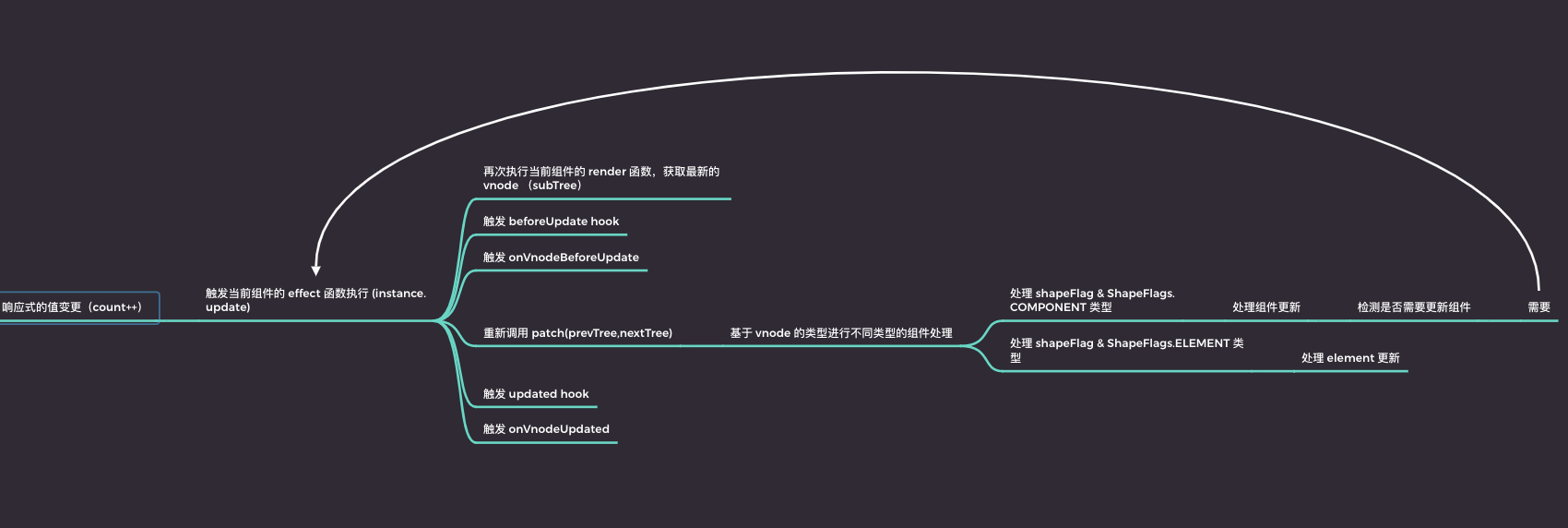
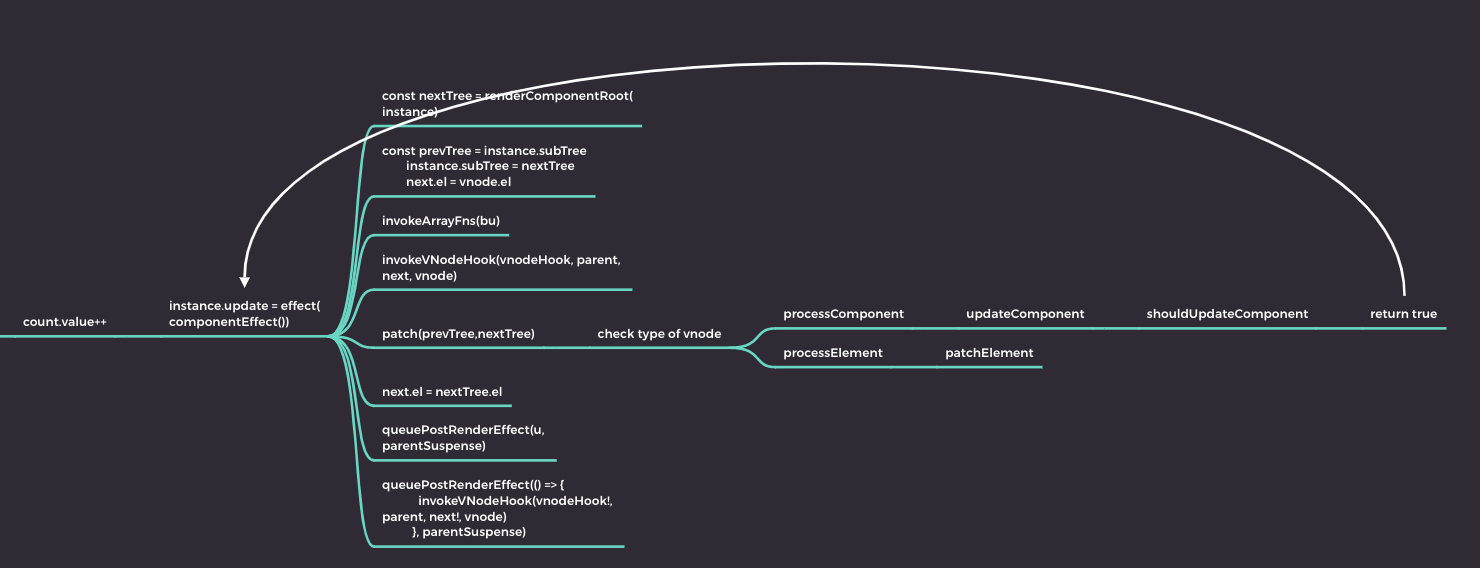
建议的阅读顺序
- 基础概念理解:
- 首先,熟悉 TypeScript 语言,了解其接口、泛型、装饰器等特性。
- 学习 ES6 的 Proxy 和 Reflect API,因为 Vue3 响应式系统基于这些特性构建。
- 响应式系统:
- 从
@vue/reactivity 模块开始,阅读 ref、reactive、readonly、shallowRef、shallowReactive、toRefs 等核心 API 的实现,理解如何创建和跟踪响应式对象。
- 探究
effect、track、trigger、ComputedRefImpl 等响应式依赖收集与更新的实现细节。
- 组件生命周期与渲染:
- 阅读
@vue/runtime-core 模块,理解 Vue 组件的基础结构,如 Component、VNode、Renderer 等概念。
- 分析组件的生命周期钩子函数如何运作,重点关注
setup 函数、h(hyperscript)函数等。
- 研究虚拟 DOM 的创建、Diff 算法、DOM 更新等相关逻辑。
- 渲染器适配:
- 阅读
@vue/runtime-dom 或 @vue/runtime-sfc 模块,了解 Vue 如何与 DOM 进行交互,包括如何挂载组件、更新 DOM、处理事件、插槽等内容。
- 对比不同平台(如 web、weex、native)的渲染器实现差异,理解 Vue 的跨平台渲染机制。
- 高级特性:
- 阅读
@vue/shared 模块,理解 Vue 提供的一些工具函数和通用逻辑。
- 分析
@vue/composition-api 或 @vue/runtime-dom 中的 provide、inject、watch、watchEffect、nextTick、ref 等高级 API 的实现。
- 深入研究 Vue Router、Vuex 等官方库与 Vue3 框架集成的实现细节。
- 编译器相关:
- 如果感兴趣,可以进一步探索 Vue 单文件组件(SFC)的编译过程,阅读
@vue/compiler-core、@vue/compiler-dom、@vue/compiler-sfc 等模块,了解模板编译成渲染函数的逻辑。
Reactivity————响应式实现
响应式作为 Vue 的一大特点,其重要性可见一斑。
reactive 是实现响应式的基础,后续的 ref,shallowreactive,readonly 都是建立在这个基础上的
本章的重心在,reactive,ref等(还有 shallow 和 readonly),以及通过 track 和 trigger 进行依赖收集,以及计算属性。
reactive
首先是创建了四个 Map,进行收集各个类型的 reactive 对象
export const reactiveMap = new WeakMap<Target, any>();
export const shallowReactiveMap = new WeakMap<Target, any>();
export const readonlyMap = new WeakMap<Target, any>();
export const shallowReadonlyMap = new WeakMap<Target, any>();
最关键的调用创建createReactiveObject
export function reactive(target: object) {
  // if trying to observe a readonly proxy, return the readonly version.
  if (isReadonly(target)) {
    return target;
  }
  return createReactiveObject(
    target,
    false,
    mutableHandlers,
    mutableCollectionHandlers,
    reactiveMap
  );
}
这里声明,相当于对这个对象进行创建响应式,且不是浅观察
createReactiveObject的声明
function createReactiveObject(
  target: Target,
  isReadonly: boolean,
  baseHandlers: ProxyHandler<any>,
  collectionHandlers: ProxyHandler<any>,
  proxyMap: WeakMap<Target, any>
) {
  if (!isObject(target)) {
    return target;
  }
  // target is already a Proxy, return it.
  // exception: calling readonly() on a reactive object
  if (
    target[ReactiveFlags.RAW] && //相当于表明是原始数据(__v_raw)
    !(isReadonly && target[ReactiveFlags.IS_REACTIVE])
  ) {
    return target;
  }
  // target already has corresponding Proxy
  const existingProxy = proxyMap.get(target); //如果之前声明过,就直接返回
  if (existingProxy) {
    return existingProxy;
  }
  // only specific value types can be observed.
  const targetType = getTargetType(target);
  if (targetType === TargetType.INVALID) {
    return target;
  }
  const proxy = new Proxy(
    target,
    targetType === TargetType.COLLECTION ? collectionHandlers : baseHandlers //看情况进行处理,如果是可收集类型,那么就使用collectionHandlers否则就正常处理
  );
  proxyMap.set(target, proxy); //将相对应的Map中存入值。
  return proxy;
}
那么对于其他的,比如 shallow,readonly 类型就是
export function shallowReactive<T extends object>(
  target: T
): ShallowReactive<T> {
  return createReactiveObject(
    target,
    false,
    shallowReactiveHandlers,
    shallowCollectionHandlers,
    shallowReactiveMap
  );
}
export function readonly<T extends object>(
  target: T
): DeepReadonly<UnwrapNestedRefs<T>> {
  return createReactiveObject(
    target,
    true,
    readonlyHandlers,
    readonlyCollectionHandlers,
    readonlyMap
  );
}
从 baseHandler 声明处理各个类型的函数
import {
  mutableHandlers,
  readonlyHandlers,
  shallowReactiveHandlers,
  shallowReadonlyHandlers,
} from "./baseHandlers";
然后就是对于是否是相对于类型的函数的实现
export function isReactive(value: unknown): boolean {
  if (isReadonly(value)) {
    return isReactive((value as Target)[ReactiveFlags.RAW]);
  }
  return !!(value && (value as Target)[ReactiveFlags.IS_REACTIVE]);
}
这句话相当于是,先看是否为只读对象,如果是,就进行查找原本的对象是否为 Reactive 类型;否则就是查找是否存在 value 且满足 value 上存在__v_isReactive
是在定义 Target 接口时定义的ReactiveFlags.IS_REACTIVE
export interface Target {
  [ReactiveFlags.SKIP]?: boolean;
  [ReactiveFlags.IS_REACTIVE]?: boolean;
  [ReactiveFlags.IS_READONLY]?: boolean;
  [ReactiveFlags.IS_SHALLOW]?: boolean;
  [ReactiveFlags.RAW]?: any;
}
ReactiveFlags.RAW 是 any 的原因,因为包裹的可能是对象可能是数组也可能是一些基本数据。
baseHandler
在 BaseReactiveHandler 中,定义了 get 方法(是每一个 Handler 都有的)
get 方法里面有很多杂乱的。
最核心的就是取数据时的拦截
也就是track方法
if (!isReadonly) {
  track(target, TrackOpTypes.GET, key);
}
其余的,在 MutableReactiveHandler,定义的,比如 set 方法,
set(
    target: object,
    key: string | symbol,
    value: unknown,
    receiver: object,
  ): boolean {
    let oldValue = (target as any)[key]
    if (!this._shallow) {
      const isOldValueReadonly = isReadonly(oldValue)
      if (!isShallow(value) && !isReadonly(value)) {
        oldValue = toRaw(oldValue)
        value = toRaw(value)
      }
      if (!isArray(target) && isRef(oldValue) && !isRef(value)) {
        if (isOldValueReadonly) {
          return false
        } else {
          oldValue.value = value
          return true
        }
      }
    } else {
      // in shallow mode, objects are set as-is regardless of reactive or not
    }

    const hadKey =
      isArray(target) && isIntegerKey(key)
        ? Number(key) < target.length
        : hasOwn(target, key)
    const result = Reflect.set(target, key, value, receiver)
    // don't trigger if target is something up in the prototype chain of original
    if (target === toRaw(receiver)) {
      if (!hadKey) {
        trigger(target, TriggerOpTypes.ADD, key, value)
      } else if (hasChanged(value, oldValue)) {
        trigger(target, TriggerOpTypes.SET, key, value, oldValue)
      }
    }
    return result
  }
使用了 trigger 方法,该属性的相关方法进行调用
track 是在 reactiveEffect 文件中声明的。
reactiveEffect
track 函数
export function track(target: object, type: TrackOpTypes, key: unknown) {
  if (shouldTrack && activeEffect) {
    let depsMap = targetMap.get(target);
    if (!depsMap) {
      targetMap.set(target, (depsMap = new Map()));
    }
    let dep = depsMap.get(key);
    if (!dep) {
      depsMap.set(key, (dep = createDep(() => depsMap!.delete(key))));
    }
    trackEffect(
      activeEffect,
      dep,
      __DEV__
        ? {
            target,
            type,
            key,
          }
        : void 0
    );
  }
}
同样的味道,进行拦截,为每个管理值的“主播”,添加“粉丝”列表。
作用:
- 函数接收三个参数:
target: 响应式对象,可能是经过 Vue3 代理过的对象,具有响应式能力。type: 操作类型,取值为TrackOpTypes枚举,通常有GET(读取属性)。key: 访问的属性名。
- 首先判断全局变量
shouldTrack是否为真且当前存在活跃的副作用函数activeEffect。若满足条件,则开始依赖收集流程。
- 从全局的
targetMap中获取target对应的依赖映射(depsMap)。如果尚未创建,就为target创建一个新的 Map 实例并存入targetMap。
- 在 depsMap 中查找对应
key的依赖项(dep)。如果没有找到,就创建一个新的Dep实例,并提供一个清理回调,当该依赖项不再被任何活跃副作用函数引用时,可以从 depsMap 中移除该 key。
- 调用
trackEffect函数将当前活跃的副作用函数(activeEffect)与新创建或已存在的依赖项关联起来,这样当依赖项对应的属性发生变化时,就可以通过这个依赖项找到并触发所有的相关副作用函数。
- 在开发环境下,还可以传入额外的调试信息,以便更好地追踪和理解依赖收集的过程。
还有 trigger 函数,也就是 set 后触发的函数。
export function trigger(
  target: object,
  type: TriggerOpTypes,
  key?: unknown,
  newValue?: unknown,
  oldValue?: unknown,
  oldTarget?: Map<unknown, unknown> | Set<unknown>
) {
  const depsMap = targetMap.get(target);
  if (!depsMap) {
    // never been tracked
    return;
  }

  let deps: (Dep | undefined)[] = [];
  if (type === TriggerOpTypes.CLEAR) {
    // collection being cleared
    // trigger all effects for target
    deps = [...depsMap.values()];
  } else if (key === "length" && isArray(target)) {
    const newLength = Number(newValue);
    depsMap.forEach((dep, key) => {
      if (key === "length" || (!isSymbol(key) && key >= newLength)) {
        deps.push(dep);
      }
    });
  } else {
    // schedule runs for SET | ADD | DELETE
    if (key !== void 0) {
      deps.push(depsMap.get(key));
    }

    // also run for iteration key on ADD | DELETE | Map.SET
    switch (type) {
      case TriggerOpTypes.ADD:
        if (!isArray(target)) {
          deps.push(depsMap.get(ITERATE_KEY));
          if (isMap(target)) {
            deps.push(depsMap.get(MAP_KEY_ITERATE_KEY));
          }
        } else if (isIntegerKey(key)) {
          // new index added to array -> length changes
          deps.push(depsMap.get("length"));
        }
        break;
      case TriggerOpTypes.DELETE:
        if (!isArray(target)) {
          deps.push(depsMap.get(ITERATE_KEY));
          if (isMap(target)) {
            deps.push(depsMap.get(MAP_KEY_ITERATE_KEY));
          }
        }
        break;
      case TriggerOpTypes.SET:
        if (isMap(target)) {
          deps.push(depsMap.get(ITERATE_KEY));
        }
        break;
    }
  }

  pauseScheduling();
  for (const dep of deps) {
    if (dep) {
      triggerEffects(
        dep,
        DirtyLevels.Dirty,
        __DEV__
          ? {
              target,
              type,
              key,
              newValue,
              oldValue,
              oldTarget,
            }
          : void 0
      );
    }
  }
  resetScheduling();
}
这段函数主要干了
- 函数
trigger接收五个参数:
target: 响应式对象,可以是 Array、Set、Map 或其他对象。type: 操作类型,取值为TriggerOpTypes枚举,表示对目标对象执行的操作,如ADD(添加元素)、DELETE(删除元素)、SET(设置属性值)、CLEAR(清空集合)等。key:在操作特定属性时传入的键名。newValue:新值,在属性被设置时传入。oldValue:旧值,在属性被改变时传入。oldTarget:对于特定操作可能需要的老的目标对象引用。
- 函数首先尝试从全局的
targetMap中获取当前target对应的依赖映射(depsMap),如果未找到,则说明该对象从未被跟踪过,直接返回。
- 根据不同的
type操作,收集所有相关的依赖(Dep 实例)到 deps 数组中。例如:
- 当
type为CLEAR时,清除整个集合,触发所有对该目标对象的依赖。
- 当操作涉及到数组长度变化时,会处理相关索引的依赖。
- 对于 Map、Set 以及数组的增删改查操作,还会触发迭代器键(ITERATE_KEY)的相关依赖。
- 使用
pauseScheduling和resetScheduling暂停和恢复调度,以批量更新所有依赖。
- 遍历收集到的所有依赖项,调用
triggerEffects函数,触发这些依赖的副作用函数执行更新,同时传入一些用于调试的详细信息。
这两个函数离不开,trackEffect 和 triggerEffects 函数也就是存在在 effect 中的
effect
export function trackEffect(
  effect: ReactiveEffect,
  dep: Dep,
  debuggerEventExtraInfo?: DebuggerEventExtraInfo
) {
  if (dep.get(effect) !== effect._trackId) {
    //验证副作用函数(effect)是否已经与当前的 Dep 关联,如果没有关联或关联的标识符(_trackId)不匹配,则将关联标识符设置到 Dep 中,并将 Dep 添加到副作用函数的依赖数组中。
    dep.set(effect, effect._trackId);
    const oldDep = effect.deps[effect._depsLength];
    if (oldDep !== dep) {
      if (oldDep) {
        cleanupDepEffect(oldDep, effect);
      }
      effect.deps[effect._depsLength++] = dep;
    } else {
      effect._depsLength++;
    }
    if (__DEV__) {
      effect.onTrack?.(extend({ effect }, debuggerEventExtraInfo!));
    }
  }
}

const queueEffectSchedulers: EffectScheduler[] = [];

export function triggerEffects(
  dep: Dep,
  dirtyLevel: DirtyLevels,
  debuggerEventExtraInfo?: DebuggerEventExtraInfo
) {
  pauseScheduling();
  for (const effect of dep.keys()) {
    if (
      effect._dirtyLevel < dirtyLevel && //遍历 Dep 中的所有副作用函数,检查它们的“脏”级别是否低于给定的 dirtyLevel,以及是否已正确关联到 Dep。
      dep.get(effect) === effect._trackId
    ) {
      const lastDirtyLevel = effect._dirtyLevel; //果满足条件,则更新副作用函数的“脏”级别,并检查是否需要安排重新执行(首次变脏的情况)。
      effect._dirtyLevel = dirtyLevel;
      if (lastDirtyLevel === DirtyLevels.NotDirty) {
        effect._shouldSchedule = true;
        if (__DEV__) {
          effect.onTrigger?.(extend({ effect }, debuggerEventExtraInfo));
        }
        effect.trigger(); //调用副作用函数的 trigger 方法,实际执行副作用函数,从而更新视图或其他相关状态。
      }
    }
  }
  scheduleEffects(dep); //调用 scheduleEffects 函数对符合条件的副作用函数进行调度。
  resetScheduling();
}
vue2 是通过 dep 和 watcher 实现收集和派发的
这里,没有读过 vue2 源码的可能有点懵不知道依赖是如何收集的。主要是靠 trackEffect 和 triggerEffects 进行收集
trackEffect 主要负责收集依赖。当一个副作用函数(如组件的渲染函数或计算属性的 getter)访问响应式对象的属性时,Vue3 会通过track函数跟踪这个访问,trackEffect就是在这个过程中被调用的。
track具体工作原理:
- 当访问响应式对象属性时,Vue3 通过
Reflect.get等操作触发track函数。
track函数会调用trackEffect,将当前激活的副作用函数(保存在全局变量activeEffect中)与当前访问的属性关联起来。这个关联存储在响应式对象的依赖映射表(如targetMap)中,建立起“副作用函数 - 数据依赖”的映射关系。- 这样,当属性值发生变化时,Vue3 就能知道哪些副作用函数需要重新执行。
trackEffect负责建立并维护一个副作用函数(effect)与依赖收集器(Dep)之间的关联。
- 检查
effect 是否已经关联到了 dep,若未关联或关联信息不一致,则将其关联起来,并更新 dep 中的记录。
- 若
effect 已经有其他依赖项,则先清理与旧依赖的关系,然后将新 dep 添加至 effect.deps 数组。
- 在开发环境下,如果
effect 定义了 onTrack 回调函数,则调用此回调,以便在开发者工具中显示依赖追踪信息。
triggerEffects 主要负责触发依赖的更新。当响应式对象的属性值发生变化时,Vue3 会通过trigger函数触发依赖的更新。
trigger具体工作原理:
- 当响应式对象属性发生变化时,Vue3 通过
Reflect.set等操作触发trigger函数。
trigger函数会遍历与该属性关联的所有副作用函数(通过依赖映射表获取),并将它们收集到一个数组中。- 调用
triggerEffects函数,遍历这些收集到的副作用函数,逐一触发它们的执行,从而引发视图或其他相关状态的更新。
triggerEffect用于触发那些依赖于特定响应式数据集合(由 dep 表示)的副作用函数。
- 遍历与
dep 相关联的所有 effect,判断其"脏"级别(dirtyLevel)是否低于当前要求的级别。
- 如果满足条件,则更新
effect 的“脏”级别,并决定是否需要安排其执行。
- 当
effect 第一次变得“脏”时,会标记其为待调度,并可能调用其 onTrigger 钩子函数来提供调试信息。
- 最终调用
effect.trigger() 来实际执行副作用函数,即完成视图更新或者其他相关的状态变更操作。
- 调用
scheduleEffects(dep) 对所有需要调度的副作用函数进行合理的异步调度处理。
- 调用
resetScheduling() 可能是为了重置调度器的状态。
ReactiveEffect 对象在,computed,watch,组件渲染(会生成一个 ReactiveEffect 对象)
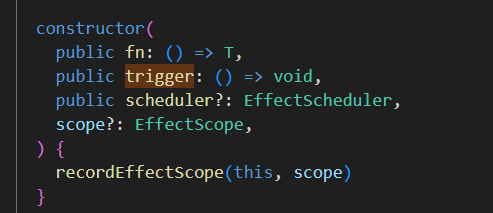 这是 ReactiveEffect
- 第二个传入的就是 trigger 函数(computed)
 trigger 是 noop(watch)
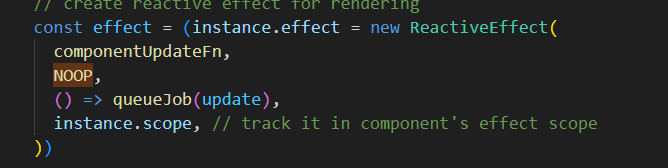 trigger 是 noop(render)
ref
ref 和 reactive 的区别,ref 能存入引用类型和基本类型,但是 reactive 只能存入引用类型。
ref 将传入的值进行包裹,将原始值放在 value 属性上,对 value 属性进行劫持。
调用 ref-->createRef——进行判断,如果本身就是 ref 直接返回,不是就进行创建新的 ref 对象(RefImpl)
function createRef(rawValue: unknown, shallow: boolean) {
  if (isRef(rawValue)) {
    return rawValue;
  }
  return new RefImpl(rawValue, shallow);
}

class RefImpl<T> {
  private _value: T;
  private _rawValue: T;

  public dep?: Dep = undefined;
  public readonly __v_isRef = true;

  constructor(value: T, public readonly __v_isShallow: boolean) {
    this._rawValue = __v_isShallow ? value : toRaw(value);
    this._value = __v_isShallow ? value : toReactive(value);
  }

  get value() {
    trackRefValue(this);
    return this._value;
  }

  set value(newVal) {
    const useDirectValue =
      this.__v_isShallow || isShallow(newVal) || isReadonly(newVal);
    newVal = useDirectValue ? newVal : toRaw(newVal);
    if (hasChanged(newVal, this._rawValue)) {
      this._rawValue = newVal;
      this._value = useDirectValue ? newVal : toReactive(newVal);
      triggerRefValue(this, DirtyLevels.Dirty, newVal);
    }
  }
}
ref 的 value 是会调用 toReactive 方法,如果是对象调用 reactive 方法,否则就是原始值
export const toReactive = <T extends unknown>(value: T): T =>
  isObject(value) ? reactive(value) : value;
get 进行拦截是使用 trackRefValue 实际上是调用了 trackeffect 方法(和 reactive 进行劫持一样的,在reactiveEffect中)
然后生成一个 dep 对象,进行监视数据(更准确的说是管理依赖关系的对象,类似于桥梁,将数据更新和视图变化联系起来),使用它来收集所有订阅了这个属性的观察者
- 当一个响应式对象的属性被访问(读取)时,Vue 会调用
track 函数,此时如果存在活跃的副作用函数(activeEffect),则将这个副作用函数添加到该属性所对应的 Dep 对象的依赖列表中。
- 当该属性的值发生改变时,Vue 会调用
trigger 函数,遍历并触发与该属性相关的所有 Dep 对象中的所有副作用函数,通知它们重新运行,以此实现视图的自动更新。
set 进行拦截主要是调用的 triggerEffect 进行拦截
triggerEffect 主要步骤:
- 先调用
pauseScheduling进行暂停调度器。
- 遍历
dep中的所有副作用函数(effect):
- 检查当前副作用函数的脏级别是否小于传入的
dirtyLevel,如果是并且dep中存储的trackId与此副作用函数当前的_trackId一致,那么继续执行。
- 更新副作用函数的脏级别为传入的
dirtyLevel。
- 如果之前该副作用函数的脏级别为
DirtyLevels.NotDirty(即还未执行过),将其标记为应该被调度,并在开发环境时调用onTrigger钩子函数(如果有),同时附加上调试信息。
- 调用副作用函数的
trigger方法,实际执行副作用逻辑(通常是重新渲染组件)。
- 调用
scheduleEffects(dep)对符合条件的副作用函数进行调度,决定何时执行这些函数。
- 最后调用
resetScheduling恢复调度器的工作。
export function triggerEffects(
  dep: Dep,
  dirtyLevel: DirtyLevels,
  debuggerEventExtraInfo?: DebuggerEventExtraInfo
) {
  pauseScheduling();
  for (const effect of dep.keys()) {
    if (
      effect._dirtyLevel < dirtyLevel &&
      dep.get(effect) === effect._trackId
    ) {
      const lastDirtyLevel = effect._dirtyLevel;
      effect._dirtyLevel = dirtyLevel;
      if (lastDirtyLevel === DirtyLevels.NotDirty) {
        effect._shouldSchedule = true;
        if (__DEV__) {
          effect.onTrigger?.(extend({ effect }, debuggerEventExtraInfo));
        }
        effect.trigger();
      }
    }
  }
  scheduleEffects(dep);
  resetScheduling();
}
但是 reactive 进行拦截实现的更多。
reactive 的 set 拦截在baseHanlder中的 MutableReactiveHandler,里面进行了 shallow 和 readonly 的判断,然后比较新旧值,其不同才调用的 trigger 方法。
两者的不同之处:
trigger 函数:
- 定义:
trigger 函数负责处理响应式对象(如对象、数组或 Map 等)在数据发生变化时的具体触发逻辑。
- 功能:当数据变化时,
trigger 函数首先根据变化类型(如添加、删除、修改或清空等)和具体的键值信息,从响应式对象的依赖映射表(depsMap)中收集所有相关的依赖(Dep 对象)。
- 结果:收集完成后,
trigger 函数会暂停调度器,然后逐个触发这些依赖(Dep 对象),并通过调用 triggerEffects 函数来执行对应的副作用函数(如组件的渲染函数等)。
triggerEffects 函数:
- 定义:
triggerEffects 函数则是真正执行副作用函数的地方。
- 功能:接收一个
Dep 对象和一个脏级别作为参数。Dep 对象包含了一组关联的副作用函数,脏级别决定了哪些副作用函数应该被触发执行。
- 结果:遍历
Dep 对象中的所有副作用函数,根据它们的脏级别和调度状态,决定是否执行副作用函数。执行副作用函数会导致视图更新或其他相应的行为。
computed
- 创建内部结构:
- 在
computed.ts 内部,Vue3 会通过 computedRef 或类似的工厂函数创建一个特殊的引用(Ref),这个引用具有追踪依赖的能力。
- 这个引用背后维护了一个
getter 函数和一个可选的 setter 函数,以及对依赖关系的跟踪。
- 依赖追踪:
- 当首次读取计算属性时,它会执行
getter 函数,并使用响应式系统去追踪在其内部访问的所有其他响应式状态。
- 这些依赖项会被记录在一个依赖集合(Dep)中,与当前计算属性相关联。
- 缓存与懒计算:
- 计算属性的结果会被缓存起来,只有当它的依赖项发生改变时,才会重新计算。
- 如果任何依赖的状态改变,Vue3 会通过响应式系统的
trigger 函数,找到依赖了该改变状态的所有计算属性,并通过 triggerEffects 触发它们的更新。
- 更新视图:
- 当计算属性值发生变化时,由于它是响应式的,因此会自动触发依赖它的视图更新或者其他订阅者。
- 访问计算属性:
- 在模板或者 JavaScript 中,可以直接像访问普通 Ref 一样访问计算属性,Vue3 的响应式系统会确保在正确的时间点获取最新且正确的计算结果。
在使用计算属性的时候,是将一个函数或者一个配置对象作为参数传入computed
也就是调用了 computed 这个函数
export class ComputedRefImpl<T> {
  public dep?: Dep = undefined;

  private _value!: T;
  public readonly effect: ReactiveEffect<T>;

  public readonly __v_isRef = true;
  public readonly [ReactiveFlags.IS_READONLY]: boolean = false;

  public _cacheable: boolean;

  constructor(
    getter: ComputedGetter<T>,
    private readonly _setter: ComputedSetter<T>,
    isReadonly: boolean,
    isSSR: boolean
  ) {
    this.effect = new ReactiveEffect(
      () => getter(this._value),
      () => triggerRefValue(this, DirtyLevels.MaybeDirty),
      () => this.dep && scheduleEffects(this.dep)
    );
    this.effect.computed = this;
    this.effect.active = this._cacheable = !isSSR;
    this[ReactiveFlags.IS_READONLY] = isReadonly;
  }

  get value() {
    // the computed ref may get wrapped by other proxies e.g. readonly() #3376
    const self = toRaw(this);
    if (!self._cacheable || self.effect.dirty) {
      if (hasChanged(self._value, (self._value = self.effect.run()!))) {
        triggerRefValue(self, DirtyLevels.Dirty);
      }
    }
    trackRefValue(self);
    if (self.effect._dirtyLevel >= DirtyLevels.MaybeDirty) {
      triggerRefValue(self, DirtyLevels.MaybeDirty);
    }
    return self._value;
  }

  set value(newValue: T) {
    this._setter(newValue);
  }

  // #region polyfill _dirty for backward compatibility third party code for Vue <= 3.3.x
  get _dirty() {
    return this.effect.dirty;
  }

  set _dirty(v) {
    this.effect.dirty = v;
  }
  // #endregion
}

export function computed<T>(
  getter: ComputedGetter<T>,
  debugOptions?: DebuggerOptions
): ComputedRef<T>;
export function computed<T>(
  options: WritableComputedOptions<T>,
  debugOptions?: DebuggerOptions
): WritableComputedRef<T>;
export function computed<T>(
  getterOrOptions: ComputedGetter<T> | WritableComputedOptions<T>,
  debugOptions?: DebuggerOptions,
  isSSR = false
) {
  let getter: ComputedGetter<T>;
  let setter: ComputedSetter<T>;

  const onlyGetter = isFunction(getterOrOptions);
  if (onlyGetter) {
    getter = getterOrOptions;
    setter = __DEV__
      ? () => {
          console.warn("Write operation failed: computed value is readonly");
        }
      : NOOP;
  } else {
    getter = getterOrOptions.get;
    setter = getterOrOptions.set;
  }

  const cRef = new ComputedRefImpl(
    getter,
    setter,
    onlyGetter || !setter,
    isSSR
  );

  if (__DEV__ && debugOptions && !isSSR) {
    cRef.effect.onTrack = debugOptions.onTrack;
    cRef.effect.onTrigger = debugOptions.onTrigger;
  }

  return cRef as any;
}
第一个重载就是只包含一个 getter 函数:
当仅传入一个 getter 函数时,表明这是一个只读计算属性。getter 函数用于计算值,而 setter 被默认设置为一个空操作(noop),并在开发环境下打印警告信息,提示用户尝试修改只读计算属性。
第二个是只包含 options 的函数
当传入一个选项对象时,此对象应该包含 get 和 set 属性,分别对应计算属性的 getter 和 setter 函数。这样创建的是一个可读写的计算属性。
传入之后,判断是否是函数还是对象,然后分别给getter和setter
然后根据这些创建一个 ComputedRefImpl
export class ComputedRefImpl<T> {
  public dep?: Dep = undefined;

  private _value!: T;
  public readonly effect: ReactiveEffect<T>;

  public readonly __v_isRef = true;
  public readonly [ReactiveFlags.IS_READONLY]: boolean = false;

  public _cacheable: boolean;

  constructor(
    getter: ComputedGetter<T>,
    private readonly _setter: ComputedSetter<T>,
    isReadonly: boolean,
    isSSR: boolean
  ) {
    this.effect = new ReactiveEffect(
      () => getter(this._value),
      () => triggerRefValue(this, DirtyLevels.MaybeDirty),
      () => this.dep && scheduleEffects(this.dep)
    );
    this.effect.computed = this;
    this.effect.active = this._cacheable = !isSSR;
    this[ReactiveFlags.IS_READONLY] = isReadonly;
  }

  get value() {
    // the computed ref may get wrapped by other proxies e.g. readonly() #3376
    const self = toRaw(this);
    if (!self._cacheable || self.effect.dirty) {
      if (hasChanged(self._value, (self._value = self.effect.run()!))) {
        triggerRefValue(self, DirtyLevels.Dirty);
      }
    }
    trackRefValue(self);
    if (self.effect._dirtyLevel >= DirtyLevels.MaybeDirty) {
      triggerRefValue(self, DirtyLevels.MaybeDirty);
    }
    return self._value;
  }

  set value(newValue: T) {
    this._setter(newValue);
  }

  // #region polyfill _dirty for backward compatibility third party code for Vue <= 3.3.x
  get _dirty() {
    return this.effect.dirty;
  }

  set _dirty(v) {
    this.effect.dirty = v;
  }
  // #endregion
}
这个对象是会生成一个 effect,其作用是:计算属性的依赖收集、更新调度、结果缓存以及自定义副作用逻辑。
- 依赖收集: 当计算属性的
getter 函数被调用时,与之关联的 effect 会跟踪并收集所有访问到的响应式依赖。这意味着它会记录下哪些响应式状态(如 ref、reactive 对象属性)被计算属性所依赖。
- 调度更新: 当计算属性的依赖项发生变化时,响应式系统会触发这些依赖项的更新。对应的
effect 会检测到依赖变化,进而重新执行 getter 函数以计算新的值,并根据新值更新相关联的视图或其它依赖于计算属性的组件状态。
- 懒计算与缓存: 通过
effect,Vue3 能够实现计算属性的懒计算和结果缓存机制。只有当计算属性的依赖发生变化时,才会重新执行 getter 函数并更新结果,否则会直接返回缓存的值,从而提高性能。
- 自定义副作用行为: 开发者可以在创建
effect 时传递自定义的副作用函数和其他选项,允许更灵活地控制副作用函数的执行时机和行为,比如在跟踪依赖时附加额外的调试信息、或者在触发时执行额外的逻辑。
effect 是ReactiveEffect(也就是处理响应式副作用的类)
ReactiveEffect 传入的东西,第一个是取值调用的函数,第二个是设置值调用的函数,第三个是调度器,第四个是作用域(可选)
export class ReactiveEffect<T = any> {
  active = true;
  deps: Dep[] = [];

  /**
   * Can be attached after creation
   * @internal
   */
  computed?: ComputedRefImpl<T>;
  /**
   * @internal
   */
  allowRecurse?: boolean;

  onStop?: () => void;
  // dev only
  onTrack?: (event: DebuggerEvent) => void;
  // dev only
  onTrigger?: (event: DebuggerEvent) => void;

  /**
   * @internal
   */
  _dirtyLevel = DirtyLevels.Dirty;
  /**
   * @internal
   */
  _trackId = 0;
  /**
   * @internal
   */
  _runnings = 0;
  /**
   * @internal
   */
  _shouldSchedule = false;
  /**
   * @internal
   */
  _depsLength = 0;

  constructor(
    public fn: () => T,
    public trigger: () => void,
    public scheduler?: EffectScheduler,
    scope?: EffectScope
  ) {
    recordEffectScope(this, scope);
  }

  public get dirty() {
    if (this._dirtyLevel === DirtyLevels.MaybeDirty) {
      pauseTracking();
      for (let i = 0; i < this._depsLength; i++) {
        const dep = this.deps[i];
        if (dep.computed) {
          triggerComputed(dep.computed);
          if (this._dirtyLevel >= DirtyLevels.Dirty) {
            break;
          }
        }
      }
      if (this._dirtyLevel < DirtyLevels.Dirty) {
        this._dirtyLevel = DirtyLevels.NotDirty;
      }
      resetTracking();
    }
    return this._dirtyLevel >= DirtyLevels.Dirty;
  }

  public set dirty(v) {
    this._dirtyLevel = v ? DirtyLevels.Dirty : DirtyLevels.NotDirty;
  }

  run() {
    this._dirtyLevel = DirtyLevels.NotDirty;
    if (!this.active) {
      return this.fn();
    }
    let lastShouldTrack = shouldTrack;
    let lastEffect = activeEffect;
    try {
      shouldTrack = true;
      activeEffect = this;
      this._runnings++;
      preCleanupEffect(this);
      return this.fn();
    } finally {
      postCleanupEffect(this);
      this._runnings--;
      activeEffect = lastEffect;
      shouldTrack = lastShouldTrack;
    }
  }

  stop() {
    if (this.active) {
      preCleanupEffect(this);
      postCleanupEffect(this);
      this.onStop?.();
      this.active = false;
    }
  }
}
public get dirty 方法:
- 返回一个布尔值,表示当前
ReactiveEffect 是否为“脏”。在获取过程中,如果当前的“脏”级别是 DirtyLevels.MaybeDirty,则会进一步检查其依赖的计算属性(deps 数组中的 computed 对象)是否也“脏”,并递归地触发它们以确定最终的“脏”状态。最终返回当前 ReactiveEffect 是否需要重新执行。
public set dirty(v) 方法:
- 设置
ReactiveEffect 的“脏”状态。如果参数 v 为 true,则设置其为需要重新执行(DirtyLevels.Dirty);否则设置为不需要重新执行(DirtyLevels.NotDirty)。
其中还有 run 方法是在 computed 取值时调用。
- 当取 value 值时触发
get value方法
- 首先,它会检查当前计算属性实例(
this)是否可缓存(_cacheable)以及与其关联的副作用函数(effect)是否脏(需要重新计算)。如果需要重新计算,则执行副作用函数(effect.run())并更新_value。
- 使用
hasChanged函数检查新计算的值与原有值是否不同,如果不同,则触发计算属性的值变更事件(triggerRefValue)并设置为脏(DirtyLevels.Dirty)。
- 之后,无论是否需要重新计算,都会调用
trackRefValue来追踪计算属性的依赖,这是 Vue3 响应式系统依赖收集的关键步骤。
- 最后,如果副作用函数的脏级别至少为
MaybeDirty,也会触发计算属性的值变更事件,但设置为MaybeDirty级别。
- 当更新值时
- 这是计算属性的
value属性的 setter 方法,对于可写计算属性(WritableComputed),当试图设置计算属性的值时会调用。
- 它通过调用预设的
_setter函数来设置计算属性的值,_setter是在创建计算属性时传入的 setter 函数。
- 剩下两个是为了向后兼容版本低于 3.3 的
Tips:这里涉及到依赖收集
对于普通的例如
reactive 是采用的 reactiveEffect 文件下的 track 和 trigger 函数进行收集依赖。
track 调用了 trackEffect 方法;trigger 调用的 triggerEffects 方法
Ref 是采用的 trackRefValue 调用了 trackEffect 方法,triggerRefValue 调用了 triggerEffects 方法
而对于计算属性
其 get value 内部调用的 triggerRefValue(),set 调用的_setter(也就是创建时传入的 set 函数)。
希望不要被绕晕
runtime-core——组件生命周期与渲染
这章不仅涉及到组件的基础和生命周期,此外还涉及到一些高级 api 的实现
组件基础和生命周期
component.ts
主要是实现了 Vue3 组件的核心功能,涵盖了组件的整个生命周期,确保组件能够在响应式数据变化时正确地创建、更新和销毁,以及在此过程中调用相应的生命周期钩子函数。
组件的创建
uid 是组件的编号,每一个组件的编号不同
export function createComponentInstance(
  vnode: VNode,
  parent: ComponentInternalInstance | null,
  suspense: SuspenseBoundary | null
) {
  const type = vnode.type as ConcreteComponent;
  // inherit parent app context - or - if root, adopt from root vnode
  const appContext =
    (parent ? parent.appContext : vnode.appContext) || emptyAppContext;

  const instance: ComponentInternalInstance = {
    uid: uid++,
    vnode,
    type,
    parent,
    appContext,
    root: null!, // to be immediately set
    next: null,
    subTree: null!, // will be set synchronously right after creation
    effect: null!,
    update: null!, // will be set synchronously right after creation
    scope: new EffectScope(true /* detached */),
    render: null,
    proxy: null,
    exposed: null,
    exposeProxy: null,
    withProxy: null,
    provides: parent ? parent.provides : Object.create(appContext.provides),
    accessCache: null!,
    renderCache: [],

    // local resolved assets
    components: null,
    directives: null,

    // resolved props and emits options
    propsOptions: normalizePropsOptions(type, appContext),
    emitsOptions: normalizeEmitsOptions(type, appContext),

    // emit
    emit: null!, // to be set immediately
    emitted: null,

    // props default value
    propsDefaults: EMPTY_OBJ,

    // inheritAttrs
    inheritAttrs: type.inheritAttrs,

    // state
    ctx: EMPTY_OBJ,
    data: EMPTY_OBJ,
    props: EMPTY_OBJ,
    attrs: EMPTY_OBJ,
    slots: EMPTY_OBJ,
    refs: EMPTY_OBJ,
    setupState: EMPTY_OBJ,
    setupContext: null,

    attrsProxy: null,
    slotsProxy: null,

    // suspense related
    suspense,
    suspenseId: suspense ? suspense.pendingId : 0,
    asyncDep: null,
    asyncResolved: false,

    // lifecycle hooks
    // not using enums here because it results in computed properties
    isMounted: false,
    isUnmounted: false,
    isDeactivated: false,
    bc: null,
    c: null,
    bm: null,
    m: null,
    bu: null,
    u: null,
    um: null,
    bum: null,
    da: null,
    a: null,
    rtg: null,
    rtc: null,
    ec: null,
    sp: null,
  };
  if (__DEV__) {
    instance.ctx = createDevRenderContext(instance);
  } else {
    instance.ctx = { _: instance };
  }
  instance.root = parent ? parent.root : instance;
  instance.emit = emit.bind(null, instance);

  // apply custom element special handling
  if (vnode.ce) {
    vnode.ce(instance);
  }

  return instance;
}
包含组件的各个信息,包括,父组件,子组件,数据,插槽等等
定义了组件之后,就是组件的初始化。
也就是调用的setupComponent函数
export function setupComponent(
  instance: ComponentInternalInstance,
  isSSR = false
) {
  isSSR && setInSSRSetupState(isSSR);

  const { props, children } = instance.vnode;
  const isStateful = isStatefulComponent(instance);
  initProps(instance, props, isStateful, isSSR);
  initSlots(instance, children);

  const setupResult = isStateful
    ? setupStatefulComponent(instance, isSSR)
    : undefined;

  isSSR && setInSSRSetupState(false);
  return setupResult;
}
这里初始化了 props(属性,定义在 componentProps.ts)和 slot(插槽,定义在 componentSlots.ts)
initProps 主要干了:
- 初始化 props 和 attrs 对象:
- 创建空的
props和attrs对象,用于存储组件实例的 props 和非 prop 属性(HTML attributes)。
- 设置 attrs 的元信息:
- 使用
def函数设置attrs对象的元信息,表明它是一个内部 Vue 对象。
- 初始化 props 默认值:
- 设置
instance.propsDefaults为一个空对象,用于存储组件 props 的默认值。
- 填充 props 和 attrs:
- 调用
setFullProps函数,根据传入的原始 props(rawProps)填充props和attrs对象。
- 确保声明的 props 存在:
- 遍历组件声明的 props 选项,若某个声明的 props 未在
props对象中找到,则将其值设为undefined。
- 验证 props:
- 在开发环境下,调用
validateProps函数验证 props 的有效性,确保 props 的类型和格式符合预期。
- 根据组件类型设置 props 和 attrs:
- 根据组件是否是状态化组件(
isStateful):
- 如果是状态化组件并且不是服务器端渲染(SSR),将 props 对象转换为浅响应式对象并赋值给组件实例的
props属性。
- 如果是状态化组件并且是 SSR,直接将 props 赋值给组件实例的
props属性。
- 如果是非状态化组件(函数式组件):
- 如果组件没有声明 props,那么 props 和 attrs 指向同一个对象。
- 如果组件声明了 props,则将填充后的 props 对象赋值给组件实例的
props属性。
- 设置 attrs:
- 不论组件类型如何,都将填充后的 attrs 对象赋值给组件实例的
attrs属性。
initSlots 主要干了:
- 判断是否存在 slots:
- 首先检查组件实例的 vnode(虚拟节点)的形状标志(shapeFlag)是否包含
ShapeFlags.SLOTS_CHILDREN,表示子组件接受插槽内容。
- 处理已编译插槽:
- 如果存在已编译的插槽(即 type 属性存在),则提取插槽类型,并将原始的(非代理的)插槽内容赋值给组件实例的
slots属性,同时设置_属性为插槽类型,但设置为不可枚举。
- 标准化对象插槽:
- 如果插槽内容是对象形式的原始插槽,调用
normalizeObjectSlots函数,将原始插槽对象规范化,并填充到组件实例的slots属性中。
- 处理默认插槽和命名插槽:
- 如果不存在已编译的插槽,或者插槽内容不是对象形式,则为组件实例分配一个空的
slots对象。如果children参数不为空,则调用normalizeVNodeSlots函数,将常规的 VNode 子节点(包括默认插槽和命名插槽)转换为适合内部使用的格式。
- 设置元信息:
- 最后,不论何种情况,都会在组件实例的
slots属性上设置元信息,标记为内部对象。
这里,isStateful 是用来判断当前组件是否“有状态”,即拥有 setup 的组件(即通过 options 创建的)
setupStatefulComponent 函数
function setupStatefulComponent(
  instance: ComponentInternalInstance,
  isSSR: boolean
) {
  const Component = instance.type as ComponentOptions;

  if (__DEV__) {
    if (Component.name) {
      validateComponentName(Component.name, instance.appContext.config);
    }
    if (Component.components) {
      const names = Object.keys(Component.components);
      for (let i = 0; i < names.length; i++) {
        validateComponentName(names[i], instance.appContext.config);
      }
    }
    if (Component.directives) {
      const names = Object.keys(Component.directives);
      for (let i = 0; i < names.length; i++) {
        validateDirectiveName(names[i]);
      }
    }
    if (Component.compilerOptions && isRuntimeOnly()) {
      warn(
        `"compilerOptions" is only supported when using a build of Vue that ` +
          `includes the runtime compiler. Since you are using a runtime-only ` +
          `build, the options should be passed via your build tool config instead.`
      );
    }
  }
  // 0. create render proxy property access cache
  instance.accessCache = Object.create(null);
  // 1. create public instance / render proxy
  // also mark it raw so it's never observed
  instance.proxy = markRaw(
    new Proxy(instance.ctx, PublicInstanceProxyHandlers)
  );
  if (__DEV__) {
    exposePropsOnRenderContext(instance);
  }
  // 2. call setup()
  const { setup } = Component;
  if (setup) {
    const setupContext = (instance.setupContext =
      setup.length > 1 ? createSetupContext(instance) : null);

    const reset = setCurrentInstance(instance);
    pauseTracking();
    const setupResult = callWithErrorHandling(
      setup,
      instance,
      ErrorCodes.SETUP_FUNCTION,
      [__DEV__ ? shallowReadonly(instance.props) : instance.props, setupContext]
    );
    resetTracking();
    reset();

    if (isPromise(setupResult)) {
      setupResult.then(unsetCurrentInstance, unsetCurrentInstance);
      if (isSSR) {
        // return the promise so server-renderer can wait on it
        return setupResult
          .then((resolvedResult: unknown) => {
            handleSetupResult(instance, resolvedResult, isSSR);
          })
          .catch((e) => {
            handleError(e, instance, ErrorCodes.SETUP_FUNCTION);
          });
      } else if (__FEATURE_SUSPENSE__) {
        // async setup returned Promise.
        // bail here and wait for re-entry.
        instance.asyncDep = setupResult;
      } else if (__DEV__) {
        warn(
          `setup() returned a Promise, but the version of Vue you are using ` +
            `does not support it yet.`
        );
      }
    } else {
      handleSetupResult(instance, setupResult, isSSR);
    }
  } else {
    finishComponentSetup(instance, isSSR);
  }
}
- 获取组件实例的类型(ComponentOptions),并对开发环境下的组件名称、组件内的组件和指令名称进行验证,确保它们符合规范。
- 初始化组件实例的
accessCache属性,这是一个用于存储属性访问缓存的对象。
- 创建组件实例的代理(proxy)对象,该对象公开了一些公共方法和属性,同时被标记为
markRaw,意味着不会被 Vue 的响应式系统追踪。
- 在开发环境下,将 props 暴露到渲染上下文中以供 IDE 工具提示和调试。
- 获取组件的
setup函数,如果有setup函数,则执行以下步骤:
- 创建
setupContext对象,用于在setup函数中访问 props 和 emit 等上下文信息。
- 使用
setCurrentInstance设置当前组件实例,并暂停依赖收集(pauseTracking)。
- 执行
setup函数,捕获错误并传递 props 和 setupContext 作为参数。
- 重置依赖收集(resetTracking)并还原当前组件实例(resetCurrentInstance)。
- 判断
setup函数的返回值是否为 Promise:
- 如果是 Promise,根据环境(SSR 与否及是否支持 Suspense)处理异步结果。如果是 SSR,等待 Promise 解决后继续处理;如果是客户端渲染且支持 Suspense,将 Promise 保存到 asyncDep 属性中,等待 Suspense 边界;否则抛出警告。
- 如果不是 Promise,直接处理同步的结果(调用
handleSetupResult函数)。
- 如果组件没有
setup函数,则调用finishComponentSetup函数完成组件的剩余初始化工作。
export function createSetupContext(
  instance: ComponentInternalInstance
): SetupContext {
  const expose: SetupContext["expose"] = (exposed) => {
    instance.exposed = exposed || {};
  };
  return {
    get attrs() {
      return getAttrsProxy(instance);
    },
    slots: instance.slots,
    emit: instance.emit,
    expose,
  };
}
创建上下文对象,包含了插槽,触发,还有向外暴露的对象,以及非 prop 属性的代理对象
该函数就是创建了一个上下文对象(删除了一部分东西)
export function finishComponentSetup(
  instance: ComponentInternalInstance,
  isSSR: boolean,
  skipOptions?: boolean
) {
  const Component = instance.type as ComponentOptions;

  // template / render function normalization
  // could be already set when returned from setup()
  if (!instance.render) {
    // only do on-the-fly compile if not in SSR - SSR on-the-fly compilation
    // is done by server-renderer
    if (!isSSR && compile && !Component.render) {
      const template =
        (__COMPAT__ &&
          instance.vnode.props &&
          instance.vnode.props["inline-template"]) ||
        Component.template ||
        resolveMergedOptions(instance).template;
      if (template) {
        if (__DEV__) {
          startMeasure(instance, `compile`);
        }
        const { isCustomElement, compilerOptions } = instance.appContext.config;
        const { delimiters, compilerOptions: componentCompilerOptions } =
          Component;
        const finalCompilerOptions: CompilerOptions = extend(
          extend(
            {
              isCustomElement,
              delimiters,
            },
            compilerOptions
          ),
          componentCompilerOptions
        );

        Component.render = compile(template, finalCompilerOptions);
        if (__DEV__) {
          endMeasure(instance, `compile`);
        }
      }
    }

    instance.render = (Component.render || NOOP) as InternalRenderFunction;

    // for runtime-compiled render functions using `with` blocks, the render
    // proxy used needs a different `has` handler which is more performant and
    // also only allows a whitelist of globals to fallthrough.
    if (installWithProxy) {
      installWithProxy(instance);
    }
  }

  // support for 2.x options
  if (__FEATURE_OPTIONS_API__ && !(__COMPAT__ && skipOptions)) {
    const reset = setCurrentInstance(instance);
    pauseTracking();
    try {
      applyOptions(instance);
    } finally {
      resetTracking();
      reset();
    }
  }

  // warn missing template/render
  // the runtime compilation of template in SSR is done by server-render
}
组件的 props,slots,attrs 等初始化之后就是,要进行模版编译了。
模版编译需要看是否存在 render 函数,如果不存在
-
确保组件实例render有有效的
函数。如果没有,函数会尝试从以下途径获取并编译模板:
- 组件实例的
vnode属性中的inline-template属性。
- 组件选项(ComponentOptions)中的
template属性。
- 组件全局合并选项中的
template。
-
编译发生在非 SSR 情况下,因为在 SSR 环境下编译工作由服务器渲染器完成。
-
编译时会合并全局和组件级别的编译选项,并在开发环境下记录编译时间。
export let currentInstance: ComponentInternalInstance | null = null;

export const setCurrentInstance = (instance: ComponentInternalInstance) => {
  const prev = currentInstance;
  internalSetCurrentInstance(instance);
  instance.scope.on();
  return () => {
    instance.scope.off();
    internalSetCurrentInstance(prev);
  };
};
export const getCurrentInstance: () => ComponentInternalInstance | null = () =>
  currentInstance || currentRenderingInstance;

type CompileFunction = (
  template: string | object,
  options?: CompilerOptions
) => InternalRenderFunction;

let compile: CompileFunction | undefined;
let installWithProxy: (i: ComponentInternalInstance) => void;
export function registerRuntimeCompiler(_compile: any) {
  compile = _compile;
  installWithProxy = (i) => {
    if (i.render!._rc) {
      i.withProxy = new Proxy(
        i.ctx,
        RuntimeCompiledPublicInstanceProxyHandlers
      );
    }
  };
}
这一堆是辅助处理组件实例的当前上下文和编译相关的
- currentInstance:
- 定义一个全局变量
currentInstance,它用于存储当前正在执行 setup 函数或其它内部操作的组件实例。这个变量在 Vue3 的内部逻辑中非常重要,因为它提供了在执行过程中的组件上下文信息。
- setCurrentInstance:
- 定义一个函数
setCurrentInstance,用于设置当前组件实例,并返回一个清理函数。当进入一个组件的 setup 函数或其他内部处理时,调用这个函数将当前组件实例设置为 currentInstance。清理函数在离开当前组件上下文时调用,恢复之前的 currentInstance 值,并解除组件实例的副作用监听。
- getCurrentInstance:
- 提供一个
getCurrentInstance 函数,它返回当前的 ComponentInternalInstance 或 null。在编写 Composition API 时,可以通过这个函数获取当前组件实例,进而访问其属性、方法以及上下文信息。
- CompileFunction:
- 定义一个类型
CompileFunction,描述一个用于编译模板字符串或对象为内部渲染函数的函数签名。
- compile 和 installWithProxy:
compile 变量用于存储模板编译函数,installWithProxy 用于安装一个代理,使得在使用 with 块的运行时编译渲染函数中能更高效地访问全局变量。初始时它们都被设置为 undefined。
- registerRuntimeCompiler:
- 定义一个
registerRuntimeCompiler 函数,它接收一个编译函数 _compile 参数,并将其赋值给全局变量 compile。同时,该函数还初始化了 installWithProxy 函数,用于在运行时编译的组件实例上安装代理。当组件实例的渲染函数已经经过运行时编译时,这个函数会为该组件实例创建一个代理,使得在模板渲染时能正确处理 with 块等特性。
组件相关的文件
ComponentEmits.ts
export function emit(
  instance: ComponentInternalInstance,
  event: string,
  ...rawArgs: any[]
) {
  if (instance.isUnmounted) return;
  const props = instance.vnode.props || EMPTY_OBJ;

  let args = rawArgs;
  const isModelListener = event.startsWith("update:");

  // for v-model update:xxx events, apply modifiers on args
  const modelArg = isModelListener && event.slice(7);
  if (modelArg && modelArg in props) {
    const modifiersKey = `${
      modelArg === "modelValue" ? "model" : modelArg
    }Modifiers`;
    const { number, trim } = props[modifiersKey] || EMPTY_OBJ;
    if (trim) {
      args = rawArgs.map((a) => (isString(a) ? a.trim() : a));
    }
    if (number) {
      args = rawArgs.map(looseToNumber);
    }
  }

  let handlerName;
  let handler =
    props[(handlerName = toHandlerKey(event))] ||
    // also try camelCase event handler (#2249)
    props[(handlerName = toHandlerKey(camelize(event)))];
  // for v-model update:xxx events, also trigger kebab-case equivalent
  // for props passed via kebab-case
  if (!handler && isModelListener) {
    handler = props[(handlerName = toHandlerKey(hyphenate(event)))];
  }

  if (handler) {
    callWithAsyncErrorHandling(
      handler,
      instance,
      ErrorCodes.COMPONENT_EVENT_HANDLER,
      args
    );
  }

  const onceHandler = props[handlerName + `Once`];
  if (onceHandler) {
    if (!instance.emitted) {
      instance.emitted = {};
    } else if (instance.emitted[handlerName]) {
      return;
    }
    instance.emitted[handlerName] = true;
    callWithAsyncErrorHandling(
      onceHandler,
      instance,
      ErrorCodes.COMPONENT_EVENT_HANDLER,
      args
    );
  }

  if (__COMPAT__) {
    compatModelEmit(instance, event, args);
    return compatInstanceEmit(instance, event, args);
  }
}
- 检查组件实例是否已经卸载(
isUnmounted),如果已卸载则直接返回,不触发任何事件。
- 获取组件实例的 VNode(虚拟节点)上的 props 对象。
- 处理
v-model相关事件:
- 检查事件名是否以
update:开头,若是,则认为这是一个v-model更新事件(如update:modelValue)。
- 对应的 model 属性(如
modelValue)在 props 中查找是否有修饰符(如number和trim),如有则按需对传递的参数进行转换(数字转换或去除首尾空白字符)。
- 查找事件对应的处理器(handler):
- 根据原始事件名和驼峰式事件名(如
change和onChange)在 props 对象中查找事件处理器。
- 调用事件处理器(handler):
- 如果找到了事件处理器,则使用
callWithAsyncErrorHandling包装调用,以处理可能发生的错误,并提供错误处理的上下文。
- 如果事件处理器中有一次性执行的版本(
onceHandler),则在首次触发时调用,并将触发状态存储在组件实例的emitted对象中,避免重复触发。
emit 是基于 props 里面的 onXXX 的函数来进行匹配的
ComponentProps
这里面最主要的就是初始化 props
export function initProps(
  instance: ComponentInternalInstance,
  rawProps: Data | null,
  isStateful: number, // result of bitwise flag comparison
  isSSR = false
) {
  const props: Data = {};
  const attrs: Data = {};
  def(attrs, InternalObjectKey, 1);

  instance.propsDefaults = Object.create(null);

  setFullProps(instance, rawProps, props, attrs);

  // ensure all declared prop keys are present
  for (const key in instance.propsOptions[0]) {
    if (!(key in props)) {
      props[key] = undefined;
    }
  }

  // validation
  if (__DEV__) {
    validateProps(rawProps || {}, props, instance);
  }

  if (isStateful) {
    // stateful
    instance.props = isSSR ? props : shallowReactive(props);
  } else {
    if (!instance.type.props) {
      // functional w/ optional props, props === attrs
      instance.props = attrs;
    } else {
      // functional w/ declared props
      instance.props = props;
    }
  }
  instance.attrs = attrs;
}
这里处理了两个东西attrs和props,并且初始化了 props 的默认值。
然后调用 setFullProps,以 rawProps 为蓝本,填充 props 和 attrs
ensure all declared prop keys are present
然后根据 isStateful 给 props 进行赋值,如果不是有状态的组件,且未声明 props 就将 props 设置为 attrs,因为此时两者相同。
props,是父组件向子组件传递的数据。
attrs,是所有传递给组件但并未在 props 中声明的 HTML 属性(也叫做非 props 属性)
ComponentSlots.ts
export const initSlots = (
  instance: ComponentInternalInstance,
  children: VNodeNormalizedChildren
) => {
  if (instance.vnode.shapeFlag & ShapeFlags.SLOTS_CHILDREN) {
    const type = (children as RawSlots)._;
    if (type) {
      // users can get the shallow readonly version of the slots object through `this.$slots`,
      // we should avoid the proxy object polluting the slots of the internal instance
      instance.slots = toRaw(children as InternalSlots);
      // make compiler marker non-enumerable
      def(children as InternalSlots, "_", type);
    } else {
      normalizeObjectSlots(
        children as RawSlots,
        (instance.slots = {}),
        instance
      );
    }
  } else {
    instance.slots = {};
    if (children) {
      normalizeVNodeSlots(instance, children);
    }
  }
  def(instance.slots, InternalObjectKey, 1);
};
其作用:
- 检测插槽类型:
- 首先检查组件实例的 vnode(虚拟节点)的形状标志(shapeFlag)是否设置了
ShapeFlags.SLOTS_CHILDREN,这意味着组件有子节点作为插槽内容。
- 处理已编译插槽:
- 如果存在已编译的插槽(通过检查
(children as RawSlots)._是否存在及其类型),则将原始插槽内容转换为非响应式对象赋值给组件实例的slots属性,并且设置_属性为插槽类型,同时确保该属性不可枚举。
- 处理未编译插槽:
- 如果插槽未编译,或者类型不匹配,则调用
normalizeObjectSlots函数将原始插槽内容规范化,并填充到组件实例的slots属性中。
- 初始化默认插槽:
- 如果组件没有带
ShapeFlags.SLOTS_CHILDREN标识的插槽,初始化一个空的slots对象,然后调用normalizeVNodeSlots函数处理默认插槽内容。
const normalizeObjectSlots = (
  rawSlots: RawSlots,
  slots: InternalSlots,
  instance: ComponentInternalInstance
) => {
  const ctx = rawSlots._ctx;
  for (const key in rawSlots) {
    if (isInternalKey(key)) continue;
    const value = rawSlots[key];
    if (isFunction(value)) {
      slots[key] = normalizeSlot(key, value, ctx);
    } else if (value != null) {
      if (
        __DEV__ &&
        !(
          __COMPAT__ &&
          isCompatEnabled(DeprecationTypes.RENDER_FUNCTION, instance)
        )
      ) {
        warn(
          `Non-function value encountered for slot "${key}". ` +
            `Prefer function slots for better performance.`
        );
      }
      const normalized = normalizeSlotValue(value);
      slots[key] = () => normalized;
    }
  }
};
- 获取原始插槽对象的上下文(
ctx),这个上下文通常包含组件实例的相关信息,如组件的 props、methods 等。
- 遍历原始插槽对象的所有属性(这里指代各个插槽名称)。
- 对于每个插槽名称(
key),首先检查是否是内部保留的关键字(通过isInternalKey函数判断),如果是则跳过此次循环。
- 如果插槽值(
value)是一个函数,则调用normalizeSlot函数对其进行规范化处理,并将结果存入新的slots对象中。
- 如果插槽值不是函数,但其值不为
null,则在开发环境下进行性能提示(如果启用了兼容性检查,且当前不支持旧版渲染函数),提醒开发者最好使用函数形式的插槽以获得更好的性能。
- 对于非函数的插槽值,调用
normalizeSlotValue函数将其规范化为一个返回值恒定的函数,并将此函数存入新的slots对象中。
将原始插槽对象按照 vue 的标准进行转化,以便组件内部能够正确识别
const normalizeSlot = (
  key: string,
  rawSlot: Function,
  ctx: ComponentInternalInstance | null | undefined
): Slot => {
  if ((rawSlot as any)._n) {
    // already normalized - #5353
    return rawSlot as Slot;
  }
  const normalized = withCtx((...args: any[]) => {
    return normalizeSlotValue(rawSlot(...args));
  }, ctx) as Slot;
  // NOT a compiled slot
  (normalized as ContextualRenderFn)._c = false;
  return normalized;
};
const normalizeSlotValue = (value: unknown): VNode[] =>
  isArray(value)
    ? value.map(normalizeVNode)
    : [normalizeVNode(value as VNodeChild)];
nomalizeSlotValue 是将,值变为 VNode 数组进行返回
normalized._c = false 表示这不是一个编译过的插槽函数,然后返回这个新函数
ComponentPublicInstance.ts
export const publicPropertiesMap: PublicPropertiesMap =
  // Move PURE marker to new line to workaround compiler discarding it
  // due to type annotation
  /*#__PURE__*/ extend(Object.create(null), {
    $: (i) => i,
    $el: (i) => i.vnode.el,
    $data: (i) => i.data,
    $props: (i) => (__DEV__ ? shallowReadonly(i.props) : i.props),
    $attrs: (i) => (__DEV__ ? shallowReadonly(i.attrs) : i.attrs),
    $slots: (i) => (__DEV__ ? shallowReadonly(i.slots) : i.slots),
    $refs: (i) => (__DEV__ ? shallowReadonly(i.refs) : i.refs),
    $parent: (i) => getPublicInstance(i.parent),
    $root: (i) => getPublicInstance(i.root),
    $emit: (i) => i.emit,
    $options: (i) =>
      __FEATURE_OPTIONS_API__ ? resolveMergedOptions(i) : i.type,
    $forceUpdate: (i) =>
      i.f ||
      (i.f = () => {
        i.effect.dirty = true;
        queueJob(i.update);
      }),
    $nextTick: (i) => i.n || (i.n = nextTick.bind(i.proxy!)),
    $watch: (i) => (__FEATURE_OPTIONS_API__ ? instanceWatch.bind(i) : NOOP),
  } as PublicPropertiesMap);
这里是定义组件实例的各种属性和方法
export const PublicInstanceProxyHandlers: ProxyHandler<any> = {
  get({ _: instance }: ComponentRenderContext, key: string) {
    const { ctx, setupState, data, props, accessCache, type, appContext } =
      instance

    // for internal formatters to know that this is a Vue instance


    // data / props / ctx
    // This getter gets called for every property access on the render context
    // during render and is a major hotspot. The most expensive part of this
    // is the multiple hasOwn() calls. It's much faster to do a simple property
    // access on a plain object, so we use an accessCache object (with null
    // prototype) to memoize what access type a key corresponds to.
    let normalizedProps
    if (key[0] !== '$') {
      const n = accessCache![key]
      if (n !== undefined) {
        switch (n) {
          case AccessTypes.SETUP:
            return setupState[key]
          case AccessTypes.DATA:
            return data[key]
          case AccessTypes.CONTEXT:
            return ctx[key]
          case AccessTypes.PROPS:
            return props![key]
          // default: just fallthrough
        }
      } else if (hasSetupBinding(setupState, key)) {
        accessCache![key] = AccessTypes.SETUP
        return setupState[key]
      } else if (data !== EMPTY_OBJ && hasOwn(data, key)) {
        accessCache![key] = AccessTypes.DATA
        return data[key]
      } else if (
        // only cache other properties when instance has declared (thus stable)
        // props
        (normalizedProps = instance.propsOptions[0]) &&
        hasOwn(normalizedProps, key)
      ) {
        accessCache![key] = AccessTypes.PROPS
        return props![key]
      } else if (ctx !== EMPTY_OBJ && hasOwn(ctx, key)) {
        accessCache![key] = AccessTypes.CONTEXT
        return ctx[key]
      } else if (!__FEATURE_OPTIONS_API__ || shouldCacheAccess) {
        accessCache![key] = AccessTypes.OTHER
      }
    }

    const publicGetter = publicPropertiesMap[key]
    let cssModule, globalProperties
    // public $xxx properties
    if (publicGetter) {
      if (key === '$attrs') {
        track(instance, TrackOpTypes.GET, key)
        __DEV__ && markAttrsAccessed()
      } else if (__DEV__ && key === '$slots') {
        track(instance, TrackOpTypes.GET, key)
      }
      return publicGetter(instance)
    } else if (
      // css module (injected by vue-loader)
      (cssModule = type.__cssModules) &&
      (cssModule = cssModule[key])
    ) {
      return cssModule
    } else if (ctx !== EMPTY_OBJ && hasOwn(ctx, key)) {
      // user may set custom properties to `this` that start with `$`
      accessCache![key] = AccessTypes.CONTEXT
      return ctx[key]
    } else if (
      // global properties
      ((globalProperties = appContext.config.globalProperties),
      hasOwn(globalProperties, key))
    ) {
      if (__COMPAT__) {
        const desc = Object.getOwnPropertyDescriptor(globalProperties, key)!
        if (desc.get) {
          return desc.get.call(instance.proxy)
        } else {
          const val = globalProperties[key]
          return isFunction(val)
            ? Object.assign(val.bind(instance.proxy), val)
            : val
        }
      } else {
        return globalProperties[key]
      }
    } else if (
      __DEV__ &&
      currentRenderingInstance &&
      (!isString(key) ||
        // #1091 avoid internal isRef/isVNode checks on component instance leading
        // to infinite warning loop
        key.indexOf('__v') !== 0)
    ) {
      if (data !== EMPTY_OBJ && isReservedPrefix(key[0]) && hasOwn(data, key)) {
        warn(
          `Property ${JSON.stringify(
            key,
          )} must be accessed via $data because it starts with a reserved ` +
            `character ("$" or "_") and is not proxied on the render context.`,
        )
      } else if (instance === currentRenderingInstance) {
        warn(
          `Property ${JSON.stringify(key)} was accessed during render ` +
            `but is not defined on instance.`,
        )
      }
    }
  },

  set(
    { _: instance }: ComponentRenderContext,
    key: string,
    value: any,
  ): boolean {
    const { data, setupState, ctx } = instance
    if (hasSetupBinding(setupState, key)) {
      setupState[key] = value
      return true
    } else if (
      __DEV__ &&
      setupState.__isScriptSetup &&
      hasOwn(setupState, key)
    ) {
      warn(`Cannot mutate <script setup> binding "${key}" from Options API.`)
      return false
    } else if (data !== EMPTY_OBJ && hasOwn(data, key)) {
      data[key] = value
      return true
    } else if (hasOwn(instance.props, key)) {
      __DEV__ && warn(`Attempting to mutate prop "${key}". Props are readonly.`)
      return false
    }
    if (key[0] === '$' && key.slice(1) in instance) {
      __DEV__ &&
        warn(
          `Attempting to mutate public property "${key}". ` +
            `Properties starting with $ are reserved and readonly.`,
        )
      return false
    } else {
      if (__DEV__ && key in instance.appContext.config.globalProperties) {
        Object.defineProperty(ctx, key, {
          enumerable: true,
          configurable: true,
          value,
        })
      } else {
        ctx[key] = value
      }
    }
    return true
  },


    return Reflect.defineProperty(target, key, descriptor)
  },
}
需要让用户可以直接在 render 函数内直接使用 this 来触发 proxy。
它用于创建 Vue 组件实例的公开代理对象。这个代理对象可以让开发者在模板或setup函数之外访问组件实例的部分内部状态,如 props、data、context、setupState 等。
get:当访问代理对象的属性时调用,用于根据访问的键值返回对应的属性值。它首先会尝试从不同的来源(setupState、data、props、context、globalProperties 等)查找属性值,并利用缓存(accessCache)提高查找效率。set:当尝试修改代理对象的属性值时调用,用于设置对应属性的新值。它同样会检查属性来源,并根据规则决定是否允许修改。
ComponentRenderUtils.ts
export function shouldUpdateComponent(
  prevVNode: VNode,
  nextVNode: VNode,
  optimized?: boolean
): boolean {
  const { props: prevProps, children: prevChildren, component } = prevVNode;
  const { props: nextProps, children: nextChildren, patchFlag } = nextVNode;
  const emits = component!.emitsOptions;

  // Parent component's render function was hot-updated. Since this may have
  // caused the child component's slots content to have changed, we need to
  // force the child to update as well.
  if (__DEV__ && (prevChildren || nextChildren) && isHmrUpdating) {
    return true;
  }

  // force child update for runtime directive or transition on component vnode.
  if (nextVNode.dirs || nextVNode.transition) {
    return true;
  }

  if (optimized && patchFlag >= 0) {
    if (patchFlag & PatchFlags.DYNAMIC_SLOTS) {
      // slot content that references values that might have changed,
      // e.g. in a v-for
      return true;
    }
    if (patchFlag & PatchFlags.FULL_PROPS) {
      if (!prevProps) {
        return !!nextProps;
      }
      // presence of this flag indicates props are always non-null
      return hasPropsChanged(prevProps, nextProps!, emits);
    } else if (patchFlag & PatchFlags.PROPS) {
      const dynamicProps = nextVNode.dynamicProps!;
      for (let i = 0; i < dynamicProps.length; i++) {
        const key = dynamicProps[i];
        if (
          nextProps![key] !== prevProps![key] &&
          !isEmitListener(emits, key)
        ) {
          return true;
        }
      }
    }
  } else {
    // this path is only taken by manually written render functions
    // so presence of any children leads to a forced update
    if (prevChildren || nextChildren) {
      if (!nextChildren || !(nextChildren as any).$stable) {
        return true;
      }
    }
    if (prevProps === nextProps) {
      return false;
    }
    if (!prevProps) {
      return !!nextProps;
    }
    if (!nextProps) {
      return true;
    }
    return hasPropsChanged(prevProps, nextProps, emits);
  }

  return false;
}
function hasPropsChanged(
  prevProps: Data,
  nextProps: Data,
  emitsOptions: ComponentInternalInstance["emitsOptions"]
): boolean {
  const nextKeys = Object.keys(nextProps);
  if (nextKeys.length !== Object.keys(prevProps).length) {
    return true;
  }
  for (let i = 0; i < nextKeys.length; i++) {
    const key = nextKeys[i];
    if (
      nextProps[key] !== prevProps[key] &&
      !isEmitListener(emitsOptions, key)
    ) {
      return true;
    }
  }
  return false;
}
用于判断一个组件是否需要更新的逻辑
- 父组件热更新:如果当前环境是开发环境并且父组件正在进行热更新(HMR),则强制子组件更新。
- 当前虚拟节点上有运行时指令或过渡效果:如果有运行时指令或过渡效果,则不论其他因素,都需要更新组件。
- 优化后的 patchFlag(补丁标记):根据 patchFlag 判断是否需要更新。例如,如果标记表示动态插槽内容发生变化,或者 props 发生改变,即使进行了优化也需要更新。
- 手动编写的 render 函数:对于手动编写的 render 函数,只要有子节点变化或者 props 不同,就需要更新。
比较props的变化:在非优化路径下,逐一对比 props 的变化,同时考虑到组件的emitsOptions(组件声明的 emit 事件),只有当 props 实际发生变化,并且该变化的 prop 不是 emit 事件监听器所关注的,才判定需要更新组件。
hasPropsChanged 是对 props 更加细致的比较
shouldUpdateComponent函数在 Vue3 的虚拟 DOM diff 过程中被调用,具体调用时机是在组件树的更新阶段。当 Vue 确定需要更新视图时,它会遍历组件树并对每个组件生成新的虚拟节点(VNode)。对于每一个旧虚拟节点(prevVNode)和新虚拟节点(nextVNode)对,Vue 会调用shouldUpdateComponent函数来判断是否有必要对该组件进行更新。
VNode
实现虚拟结点:vnode
创建节点:
export const createVNode = (
  __DEV__ ? createVNodeWithArgsTransform : _createVNode
) as typeof _createVNode;

function _createVNode(
  type: VNodeTypes | ClassComponent | typeof NULL_DYNAMIC_COMPONENT,
  props: (Data & VNodeProps) | null = null,
  children: unknown = null,
  patchFlag: number = 0,
  dynamicProps: string[] | null = null,
  isBlockNode = false
): VNode {
  if (!type || type === NULL_DYNAMIC_COMPONENT) {
    if (__DEV__ && !type) {
      warn(`Invalid vnode type when creating vnode: ${type}.`);
    }
    type = Comment;
  }

  if (isVNode(type)) {
    // createVNode receiving an existing vnode. This happens in cases like
    // <component :is="vnode"/>
    // #2078 make sure to merge refs during the clone instead of overwriting it
    const cloned = cloneVNode(type, props, true /* mergeRef: true */);
    if (children) {
      normalizeChildren(cloned, children);
    }
    if (isBlockTreeEnabled > 0 && !isBlockNode && currentBlock) {
      if (cloned.shapeFlag & ShapeFlags.COMPONENT) {
        currentBlock[currentBlock.indexOf(type)] = cloned;
      } else {
        currentBlock.push(cloned);
      }
    }
    cloned.patchFlag |= PatchFlags.BAIL;
    return cloned;
  }

  // class component normalization.
  if (isClassComponent(type)) {
    type = type.__vccOpts;
  }

  // 2.x async/functional component compat
  if (__COMPAT__) {
    type = convertLegacyComponent(type, currentRenderingInstance);
  }

  // class & style normalization.
  if (props) {
    // for reactive or proxy objects, we need to clone it to enable mutation.
    props = guardReactiveProps(props)!;
    let { class: klass, style } = props;
    if (klass && !isString(klass)) {
      props.class = normalizeClass(klass);
    }
    if (isObject(style)) {
      // reactive state objects need to be cloned since they are likely to be
      // mutated
      if (isProxy(style) && !isArray(style)) {
        style = extend({}, style);
      }
      props.style = normalizeStyle(style);
    }
  }

  // encode the vnode type information into a bitmap
  const shapeFlag = isString(type)
    ? ShapeFlags.ELEMENT
    : __FEATURE_SUSPENSE__ && isSuspense(type)
    ? ShapeFlags.SUSPENSE
    : isTeleport(type)
    ? ShapeFlags.TELEPORT
    : isObject(type)
    ? ShapeFlags.STATEFUL_COMPONENT
    : isFunction(type)
    ? ShapeFlags.FUNCTIONAL_COMPONENT
    : 0;

  if (__DEV__ && shapeFlag & ShapeFlags.STATEFUL_COMPONENT && isProxy(type)) {
    type = toRaw(type);
    warn(
      `Vue received a Component that was made a reactive object. This can ` +
        `lead to unnecessary performance overhead and should be avoided by ` +
        `marking the component with \`markRaw\` or using \`shallowRef\` ` +
        `instead of \`ref\`.`,
      `\nComponent that was made reactive: `,
      type
    );
  }

  return createBaseVNode(
    type,
    props,
    children,
    patchFlag,
    dynamicProps,
    shapeFlag,
    isBlockNode,
    true
  );
}
这个函数主要是检验属性和类型是否合格
- 如果传入的类型本身就是 VNode,则克隆并合并相关属性及子节点;
- 处理类组件的相关配置;
- 对于类(class)和样式(style)属性,进行规范化处理,确保它们可以正确地应用到 DOM;
- 根据类型计算 VNode 的形状标识(shapeFlag),这决定了 VNode 代表的是普通元素、组件、 suspense、 teleport 等不同类型的节点;
- 最后,通过调用
createBaseVNode进一步创建基础 VNode 对象,并传递所有必要的参数。
function createBaseVNode(
  type: VNodeTypes | ClassComponent | typeof NULL_DYNAMIC_COMPONENT,
  props: (Data & VNodeProps) | null = null,
  children: unknown = null,
  patchFlag = 0,
  dynamicProps: string[] | null = null,
  shapeFlag = type === Fragment ? 0 : ShapeFlags.ELEMENT,
  isBlockNode = false,
  needFullChildrenNormalization = false
) {
  const vnode = {
    __v_isVNode: true,
    __v_skip: true,
    type,
    props,
    key: props && normalizeKey(props),
    ref: props && normalizeRef(props),
    scopeId: currentScopeId,
    slotScopeIds: null,
    children,
    component: null,
    suspense: null,
    ssContent: null,
    ssFallback: null,
    dirs: null,
    transition: null,
    el: null,
    anchor: null,
    target: null,
    targetAnchor: null,
    staticCount: 0,
    shapeFlag,
    patchFlag,
    dynamicProps,
    dynamicChildren: null,
    appContext: null,
    ctx: currentRenderingInstance,
  } as VNode;

  if (needFullChildrenNormalization) {
    normalizeChildren(vnode, children);
    // normalize suspense children
    if (__FEATURE_SUSPENSE__ && shapeFlag & ShapeFlags.SUSPENSE) {
      (type as typeof SuspenseImpl).normalize(vnode);
    }
  } else if (children) {
    // compiled element vnode - if children is passed, only possible types are
    // string or Array.
    vnode.shapeFlag |= isString(children)
      ? ShapeFlags.TEXT_CHILDREN
      : ShapeFlags.ARRAY_CHILDREN;
  }

  // validate key
  if (__DEV__ && vnode.key !== vnode.key) {
    warn(`VNode created with invalid key (NaN). VNode type:`, vnode.type);
  }

  // track vnode for block tree
  if (
    isBlockTreeEnabled > 0 &&
    // avoid a block node from tracking itself
    !isBlockNode &&
    // has current parent block
    currentBlock &&
    // presence of a patch flag indicates this node needs patching on updates.
    // component nodes also should always be patched, because even if the
    // component doesn't need to update, it needs to persist the instance on to
    // the next vnode so that it can be properly unmounted later.
    (vnode.patchFlag > 0 || shapeFlag & ShapeFlags.COMPONENT) &&
    // the EVENTS flag is only for hydration and if it is the only flag, the
    // vnode should not be considered dynamic due to handler caching.
    vnode.patchFlag !== PatchFlags.NEED_HYDRATION
  ) {
    currentBlock.push(vnode);
  }

  if (__COMPAT__) {
    convertLegacyVModelProps(vnode);
    defineLegacyVNodeProperties(vnode);
  }

  return vnode;
}
这里最终是返回了一个 vnode 对象,以便生成 ast 语法树
- 构造 VNode 对象的基本结构,设置各种属性,如类型(type)、属性(props)、子节点(children)、patchFlag(用于优化更新过程的标记位)、动态属性(dynamicProps)、形状标识(shapeFlag,区分元素、组件、fragment 等不同类型节点)、是否为块级节点(isBlockNode)等。
- 正常化 children 属性,如果需要的话。这一步会对子节点进行处理,确保它们符合预期的格式。
- 根据 children 的类型,设置 VNode 的形状标识(shapeFlag)以区别文本节点还是数组子节点。
- 验证 key 属性的有效性。
- 如果开启了 block tree 追踪,并且当前存在一个父 block,且 VNode 需要进行 patch 更新(根据 patchFlag 和 shapeFlag 判断),则将当前 VNode 加入到 block 中。
export const Text = Symbol.for("v-txt"); //全局注册symbol
export const Comment = Symbol.for("v-cmt");
export const Static = Symbol.for("v-stc");
export const Fragment = Symbol.for("v-fgt") as any as {
  __isFragment: true;
  new (): {
    $props: VNodeProps;
  };
};

export function createTextVNode(text: string = " ", flag: number = 0): VNode {
  return createVNode(Text, null, text, flag);
}
export function createStaticVNode(
  content: string,
  numberOfNodes: number
): VNode {
  // A static vnode can contain multiple stringified elements, and the number
  // of elements is necessary for hydration.
  const vnode = createVNode(Static, null, content);
  vnode.staticCount = numberOfNodes;
  return vnode;
}
export function createCommentVNode(
  text: string = "",
  // when used as the v-else branch, the comment node must be created as a
  // block to ensure correct updates.
  asBlock: boolean = false
): VNode {
  return asBlock
    ? (openBlock(), createBlock(Comment, null, text))
    : createVNode(Comment, null, text);
}

export function normalizeVNode(child: VNodeChild): VNode {
  if (child == null || typeof child === "boolean") {
    // empty placeholder
    return createVNode(Comment);
  } else if (isArray(child)) {
    // fragment
    return createVNode(
      Fragment,
      null,
      // #3666, avoid reference pollution when reusing vnode
      child.slice()
    );
  } else if (typeof child === "object") {
    // already vnode, this should be the most common since compiled templates
    // always produce all-vnode children arrays
    return cloneIfMounted(child);
  } else {
    // strings and numbers
    return createVNode(Text, null, String(child));
  }
}
这里分别创建文本节点,静态节点,注释节点,还有标准化 vnode,让 child 支持更多格式
scheduler.ts
这一章的执行情况,有点懵,主要是与异步任务有关
由名字可知,这是与调度器相关的。
nextTick重点
声明,isFlushPending,queue(任务队列)
let isFlushPending = false;
const queue: SchedulerJob[] = [];
const resolvedPromise = /*#__PURE__*/ Promise.resolve() as Promise<any>;
let activePostFlushCbs: SchedulerJob[] | null = null;
let currentFlushPromise: Promise<void> | null = null;
export function nextTick<T = void, R = void>(
  this: T,
  fn?: (this: T) => R
): Promise<Awaited<R>> {
  const p = currentFlushPromise || resolvedPromise;
  return fn ? p.then(this ? fn.bind(this) : fn) : p;
}
export function queueJob(job: SchedulerJob) {
  // the dedupe search uses the startIndex argument of Array.includes()
  // by default the search index includes the current job that is being run
  // so it cannot recursively trigger itself again.
  // if the job is a watch() callback, the search will start with a +1 index to
  // allow it recursively trigger itself - it is the user's responsibility to
  // ensure it doesn't end up in an infinite loop.
  if (
    !queue.length ||
    !queue.includes(
      job,
      isFlushing && job.allowRecurse ? flushIndex + 1 : flushIndex
    )
  ) {
    if (job.id == null) {
      queue.push(job);
    } else {
      queue.splice(findInsertionIndex(job.id), 0, job);
    }
    queueFlush();
  }
}
queueJob 常见触发时机:
- 当响应式数据发生变化时,Vue 会调用
trigger函数,进而调用queueJob将更新视图的任务放入队列中,等待微任务阶段执行。
- 用户在组件内使用
watch API 监听数据变化时,当监听的响应式数据发生变化,对应的回调函数会被包装成一个任务并通过queueJob函数加入到任务队列中。
- 用户调用
setTimeout、Promise.then等异步 API 时,Vue 会把在其内部进行视图更新的操作封装成任务并调用queueJob。
总结下来,queueJob 在需要异步更新的地方被调度使用
比如在这些地方。
- 作用:将一个异步任务(
SchedulerJob)添加到调度队列中。Vue 中的异步任务可以是组件的渲染、watcher 回调、effect(副作用)等。
- 关系:通过调用此函数将任务放入队列,等待下一轮事件循环中被调度执行。
queueFlush
function queueFlush() {
  if (!isFlushing && !isFlushPending) {
    isFlushPending = true;
    currentFlushPromise = resolvedPromise.then(flushJobs);
  }
}
如果同时触发两个组件的更新,这里就会触发两次 then,但是没有这个必要。
- 首先,函数检查两个状态变量
isFlushing和isFlushPending。isFlushing表示是否正在执行任务队列中的工作,isFlushPending表示是否已安排在下一个异步时机执行任务队列。
- 如果当前既不在执行任务队列(
!isFlushing),也没有安排在将来执行(!isFlushPending),那么就将isFlushPending设为true,表示当前已安排了任务队列的执行。
- 然后,它调用
resolvedPromise.then(flushJobs)。这里的resolvedPromise是一个已经解决的 Promise 对象,调用其then方法可以在下一次微任务轮询时执行flushJobs函数。flushJobs函数负责从任务队列中取出并执行所有待处理的任务。
- 作用:检查当前是否已有异步更新在进行或已安排进行。如果没有,则标记异步更新已安排,并调用
resolvedPromise.then(flushJobs),使得在下一个微任务中执行flushJobs函数,开始处理队列中的任务。
- 关系:
queueJob在添加任务后通常会调用queueFlush来触发任务的执行。
export function queuePostFlushCb(cb: SchedulerJobs) {
  if (!isArray(cb)) {
    if (
      !activePostFlushCbs ||
      !activePostFlushCbs.includes(
        cb,
        cb.allowRecurse ? postFlushIndex + 1 : postFlushIndex
      )
    ) {
      pendingPostFlushCbs.push(cb);
    }
  } else {
    // if cb is an array, it is a component lifecycle hook which can only be
    // triggered by a job, which is already deduped in the main queue, so
    // we can skip duplicate check here to improve perf
    pendingPostFlushCbs.push(...cb);
  }
  queueFlush();
}
- 检查传入的回调函数
cb是否为数组。如果不是数组,则将其视为单个回调函数处理。
- 如果
activePostFlushCbs(当前活跃的 post-flush 回调队列)为空,或者cb不在活跃队列中(通过includes方法判断,考虑是否允许递归触发以及当前索引postFlushIndex),则将cb推入pendingPostFlushCbs(等待执行的 post-flush 回调队列)中。
- 如果
cb是一个数组,则认为它是由组件生命周期钩子组成的,这些钩子已经在主任务队列中去重,所以这里可以略过重复检查,直接将整个数组推入pendingPostFlushCbs。
- 不论是否添加了新的回调函数,都会调用
queueFlush()函数。这是因为,即使添加的是 post-flush 回调,也需要触发一次异步更新流程以确保所有同步任务完成后再执行这些回调。
安排执行那些需要在 DOM 更新后执行的回调函数。
- 作用:将一个 post-flush 回调函数(
SchedulerJob)添加到 post-flush 回调队列中。这些回调会在 DOM 更新之后执行,通常用于处理 DOM 交互、资源清理等操作。
- 关系:同样在添加回调后调用
queueFlush来确保回调在合适的时机执行。
function flushJobs(seen?: CountMap) {
  isFlushPending = false;
  isFlushing = true;
  if (__DEV__) {
    seen = seen || new Map();
  }

  // Sort queue before flush.
  // This ensures that:
  // 1. Components are updated from parent to child. (because parent is always
  //    created before the child so its render effect will have smaller
  //    priority number)
  // 2. If a component is unmounted during a parent component's update,
  //    its update can be skipped.
  queue.sort(comparator);

  // conditional usage of checkRecursiveUpdate must be determined out of
  // try ... catch block since Rollup by default de-optimizes treeshaking
  // inside try-catch. This can leave all warning code unshaked. Although
  // they would get eventually shaken by a minifier like terser, some minifiers
  // would fail to do that (e.g. https://github.com/evanw/esbuild/issues/1610)
  const check = __DEV__
    ? (job: SchedulerJob) => checkRecursiveUpdates(seen!, job)
    : NOOP;

  try {
    for (flushIndex = 0; flushIndex < queue.length; flushIndex++) {
      const job = queue[flushIndex];
      if (job && job.active !== false) {
        if (__DEV__ && check(job)) {
          continue;
        }
        callWithErrorHandling(job, null, ErrorCodes.SCHEDULER);
      }
    }
  } finally {
    flushIndex = 0;
    queue.length = 0;

    flushPostFlushCbs(seen);

    isFlushing = false;
    currentFlushPromise = null;
    // some postFlushCb queued jobs!
    // keep flushing until it drains.
    if (queue.length || pendingPostFlushCbs.length) {
      flushJobs(seen);
    }
  }
}
- 设置调度状态:首先将
isFlushPending设置为false,表示当前没有待刷新的任务;将isFlushing设置为true,表示已经开始执行刷新任务。
- 排序任务队列:根据任务优先级对任务队列
queue进行排序,确保父组件的更新优先于子组件,这样能保证组件树从父到子有序更新,并且在更新过程中如果某个子组件被卸载,则可以跳过其更新。
- 遍历任务队列:尝试执行队列中的每个任务。在开发环境中,会检查每个任务是否可能导致递归更新(
checkRecursiveUpdates),如果是,则跳过本次更新以防止无限循环。
- 执行任务:调用
callWithErrorHandling函数来执行每个有效的任务(active !== false),并将可能出现的错误报告给全局错误处理程序。
- 清理状态:遍历完成后,重置
flushIndex为 0,清空queue长度,执行所有 post-flush 回调函数flushPostFlushCbs。
- 结束调度:将
isFlushing设置回false,清空当前的 flush promise,并检查是否有剩余的 post-flush 回调任务或新的任务进入队列。若有,则继续调用flushJobs函数以执行剩余任务,直到队列全部清空。
这里先执行的 flushPostFlushcbs,然后再继续执行 flushjobs
- 作用:执行调度队列中的所有任务。首先对任务队列进行排序,然后依次调用每个任务,同时在开发环境下检查是否有递归更新的情况,避免无限循环。在执行完所有任务后,还会处理 post-flush 回调队列。
- 关系:由
queueFlush安排在微任务阶段调用,是任务执行的具体逻辑所在。
在 flushPostFlushCbs 中
export function flushPostFlushCbs(seen?: CountMap) {
  if (pendingPostFlushCbs.length) {
    const deduped = [...new Set(pendingPostFlushCbs)].sort(
      (a, b) => getId(a) - getId(b)
    );
    pendingPostFlushCbs.length = 0;

    // #1947 already has active queue, nested flushPostFlushCbs call
    if (activePostFlushCbs) {
      activePostFlushCbs.push(...deduped);
      return;
    }

    activePostFlushCbs = deduped;
    if (__DEV__) {
      seen = seen || new Map();
    }

    for (
      postFlushIndex = 0;
      postFlushIndex < activePostFlushCbs.length;
      postFlushIndex++
    ) {
      if (
        __DEV__ &&
        checkRecursiveUpdates(seen!, activePostFlushCbs[postFlushIndex])
      ) {
        continue;
      }
      activePostFlushCbs[postFlushIndex]();
    }
    activePostFlushCbs = null;
    postFlushIndex = 0;
  }
}
- 首先检查是否存在待处理的 post-flush 回调(
pendingPostFlushCbs.length),若存在则进行下一步操作。
- 将待处理的回调数组去重,并按回调的唯一标识(通过
getId函数获取)进行排序。
- 清空原始的
pendingPostFlushCbs队列。
- 判断是否有当前活跃的 post-flush 回调队列(
activePostFlushCbs)。如果有,则将去重后的回调追加到活跃队列中,然后结束本次函数调用。
- 若当前无活跃的 post-flush 回调队列,则将去重后的回调设置为新的活跃队列。
- 在开发环境中,会创建一个新的
seen映射表用于记录递归更新检查。
- 遍历新的活跃 post-flush 回调队列,执行每个回调。在开发环境下,会先检查回调是否会导致递归更新(
checkRecursiveUpdates),如果会,则跳过本次执行。
- 执行完所有回调后,清空活跃的 post-flush 回调队列(
activePostFlushCbs = null)以及回调索引(postFlushIndex = 0)。
- 作用:执行 post-flush 回调队列中的所有任务。与
flushJobs类似,也会进行去重、排序等操作,并在执行每个回调时检查是否有递归更新,然后执行回调函数。
- 关系:在
flushJobs函数的末尾调用,确保在 DOM 更新后执行这些回调任务
这五者的关系
queueJob和queuePostFlushCb负责将任务添加到相应队列,queueFlush负责触发任务的执行,而flushJobs和flushPostFlushCbs则分别处理常规的异步任务队列和 post-flush 回调队列。(比如 DOM 更新)
LifeStyle
export const onMounted = createHook(LifecycleHooks.MOUNTED);
export const createHook =
  <T extends Function = () => any>(lifecycle: LifecycleHooks) =>
  (hook: T, target: ComponentInternalInstance | null = currentInstance) =>
    // post-create lifecycle registrations are noops during SSR (except for serverPrefetch)
    (!isInSSRComponentSetup || lifecycle === LifecycleHooks.SERVER_PREFETCH) &&
    injectHook(lifecycle, (...args: unknown[]) => hook(...args), target);
export function injectHook(
  type: LifecycleHooks,
  hook: Function & { __weh?: Function },
  target: ComponentInternalInstance | null = currentInstance,
  prepend: boolean = false
): Function | undefined {
  if (target) {
    const hooks = target[type] || (target[type] = []);
    // cache the error handling wrapper for injected hooks so the same hook
    // can be properly deduped by the scheduler. "__weh" stands for "with error
    // handling".
    const wrappedHook =
      hook.__weh ||
      (hook.__weh = (...args: unknown[]) => {
        if (target.isUnmounted) {
          return;
        }
        // disable tracking inside all lifecycle hooks
        // since they can potentially be called inside effects.
        pauseTracking();
        // Set currentInstance during hook invocation.
        // This assumes the hook does not synchronously trigger other hooks, which
        // can only be false when the user does something really funky.
        const reset = setCurrentInstance(target);
        const res = callWithAsyncErrorHandling(hook, target, type, args);
        reset();
        resetTracking();
        return res;
      });
    if (prepend) {
      hooks.unshift(wrappedHook);
    } else {
      hooks.push(wrappedHook);
    }
    return wrappedHook;
  } else if (__DEV__) {
    const apiName = toHandlerKey(ErrorTypeStrings[type].replace(/ hook$/, ""));
    warn(
      `${apiName} is called when there is no active component instance to be ` +
        `associated with. ` +
        `Lifecycle injection APIs can only be used during execution of setup().` +
        (__FEATURE_SUSPENSE__
          ? ` If you are using async setup(), make sure to register lifecycle ` +
            `hooks before the first await statement.`
          : ``)
    );
  }
}
渲染有关
render.ts
export function createRenderer<
  HostNode = RendererNode,
  HostElement = RendererElement
>(options: RendererOptions<HostNode, HostElement>) {
  return baseCreateRenderer<HostNode, HostElement>(options);
}
先调用 createRenderer 函数
- 初始化渲染器功能:
createRenderer 函数接收一个包含一系列渲染器所需基本操作的对象作为参数,如创建元素、设置元素文本、更新属性等。- 根据提供的平台相关 API,Vue 将创建一个渲染器实例,该实例具有处理虚拟 DOM(VNode)和真实 DOM 之间转换的能力。
- 处理组件渲染:
- 渲染器中的核心方法如
render 和 patch 负责解析和更新组件的 VNode 树,将组件和元素的 VNode 转换为真实的 DOM 结构。
patch 方法比较新旧 VNode 树的不同,最小化 DOM 操作(如 diff 算法),只对发生改变的部分进行更新,以提高性能。
- 组件生命周期钩子的调用:
- 在创建和更新 DOM 的过程中,渲染器会适时地调用组件的生命周期钩子函数,如
onBeforeMount、onMounted、onBeforeUpdate、onUpdated、onBeforeUnmount、onUnmounted 等。
createRenderer(简易版)在 runtime-dom 中调用
export function createRenderer(options) {
const {
createElement: hostCreateElement,
setElementText: hostSetElementText,
patchProp: hostPatchProp,
insert: hostInsert,
remove: hostRemove,
setText: hostSetText,
createText: hostCreateText,
} = options;
const render = (vnode, container) => {
console.log("调用 patch");
patch(null, vnode, container);
};
function patch(
n1,
n2,
container = null,
anchor = null,
parentComponent = null
) {
// 基于 n2 的类型来判断
// 因为 n2 是新的 vnode
const { type, shapeFlag } = n2;
switch (type) {
case Text:
processText(n1, n2, container);
break;
// 其中还有几个类型比如: static fragment comment
case Fragment:
processFragment(n1, n2, container);
break;
default:
// 这里就基于 shapeFlag 来处理
if (shapeFlag & ShapeFlags.ELEMENT) {
console.log("处理 element");
processElement(n1, n2, container, anchor, parentComponent);
} else if (shapeFlag & ShapeFlags.STATEFUL_COMPONENT) {
console.log("处理 component");
processComponent(n1, n2, container, parentComponent);
}
}
}
function processFragment(n1: any, n2: any, container: any) {
// 只需要渲染 children ,然后给添加到 container 内
if (!n1) {
// 初始化 Fragment 逻辑点
console.log("初始化 Fragment 类型的节点");
mountChildren(n2.children, container);
}
}
function processText(n1, n2, container) {
console.log("处理 Text 节点");
if (n1 === null) {
// n1 是 null 说明是 init 的阶段
// 基于 createText 创建出 text 节点,然后使用 insert 添加到 el 内
console.log("初始化 Text 类型的节点");
hostInsert((n2.el = hostCreateText(n2.children as string)), container);
} else {
// update
// 先对比一下 updated 之后的内容是否和之前的不一样
// 在不一样的时候才需要 update text
// 这里抽离出来的接口是 setText
// 注意,这里一定要记得把 n1.el 赋值给 n2.el, 不然后续是找不到值的
const el = (n2.el = n1.el!);
if (n2.children !== n1.children) {
console.log("更新 Text 类型的节点");
hostSetText(el, n2.children as string);
}
}
}
function processElement(n1, n2, container, anchor, parentComponent) {
if (!n1) {
mountElement(n2, container, anchor);
} else {
// todo
updateElement(n1, n2, container, anchor, parentComponent);
}
}
function updateElement(n1, n2, container, anchor, parentComponent) {
const oldProps = (n1 && n1.props) || {};
const newProps = n2.props || {};
// 应该更新 element
console.log("应该更新 element");
console.log("旧的 vnode", n1);
console.log("新的 vnode", n2);
// 需要把 el 挂载到新的 vnode
const el = (n2.el = n1.el);
// 对比 props
patchProps(el, oldProps, newProps);
// 对比 children
patchChildren(n1, n2, el, anchor, parentComponent);
}
function patchProps(el, oldProps, newProps) {
// 对比 props 有以下几种情况
// 1. oldProps 有,newProps 也有,但是 val 值变更了
// 举个栗子
// 之前: oldProps.id = 1 ,更新后:newProps.id = 2
// key 存在 oldProps 里 也存在 newProps 内
// 以 newProps 作为基准
for (const key in newProps) {
const prevProp = oldProps[key];
const nextProp = newProps[key];
if (prevProp !== nextProp) {
// 对比属性
// 需要交给 host 来更新 key
hostPatchProp(el, key, prevProp, nextProp);
}
}
// 2. oldProps 有,而 newProps 没有了
// 之前: {id:1,tId:2} 更新后: {id:1}
// 这种情况下我们就应该以 oldProps 作为基准,因为在 newProps 里面是没有的 tId 的
// �还需要注意一点,如果这个 key 在 newProps 里面已经存在了,说明已经处理过了,就不要在处理了
for (const key in oldProps) {
const prevProp = oldProps[key];
const nextProp = null;
if (!(key in newProps)) {
// 这里是以 oldProps 为基准来遍历,
// 而且得到的值是 newProps 内没有的
// 所以交给 host 更新的时候,把新的值设置为 null
hostPatchProp(el, key, prevProp, nextProp);
}
}
}
function patchChildren(n1, n2, container, anchor, parentComponent) {
const { shapeFlag: prevShapeFlag, children: c1 } = n1;
const { shapeFlag, children: c2 } = n2;
// 如果 n2 的 children 是 text 类型的话
// 就看看和之前的 n1 的 children 是不是一样的
// 如果不一样的话直接重新设置一下 text 即可
if (shapeFlag & ShapeFlags.TEXT_CHILDREN) {
if (c2 !== c1) {
console.log("类型为 text_children, 当前需要更新");
hostSetElementText(container, c2 as string);
}
} else {
// 看看之前的是不是 text
if (prevShapeFlag & ShapeFlags.TEXT_CHILDREN) {
// 先清空
// 然后在把新的 children 给 mount 生成 element
hostSetElementText(container, "");
mountChildren(c2, container);
} else {
// array diff array
// 如果之前是 array_children
// 现在还是 array_children 的话
// 那么我们就需要对比两个 children 啦
patchKeyedChildren(c1, c2, container, parentComponent, anchor);
}
}
}
function patchKeyedChildren(
c1: any[],
c2: any[],
container,
parentAnchor,
parentComponent
) {
let i = 0;
const l2 = c2.length;
let e1 = c1.length - 1;
let e2 = l2 - 1;
const isSameVNodeType = (n1, n2) => {
return n1.type === n2.type && n1.key === n2.key;
};
while (i <= e1 && i <= e2) {
const prevChild = c1[i];
const nextChild = c2[i];
if (!isSameVNodeType(prevChild, nextChild)) {
console.log("两个 child 不相等(从左往右比对)");
console.log(`prevChild:${prevChild}`);
console.log(`nextChild:${nextChild}`);
break;
}
console.log("两个 child 相等,接下来对比这两个 child 节点(从左往右比对)");
patch(prevChild, nextChild, container, parentAnchor, parentComponent);
i++;
}
while (i <= e1 && i <= e2) {
// 从右向左取值
const prevChild = c1[e1];
const nextChild = c2[e2];
if (!isSameVNodeType(prevChild, nextChild)) {
console.log("两个 child 不相等(从右往左比对)");
console.log(`prevChild:${prevChild}`);
console.log(`nextChild:${nextChild}`);
break;
}
console.log("两个 child 相等,接下来对比这两个 child 节点(从右往左比对)");
patch(prevChild, nextChild, container, parentAnchor, parentComponent);
e1--;
e2--;
}
if (i > e1 && i <= e2) {
// 如果是这种情况的话就说明 e2 也就是新节点的数量大于旧节点的数量
// 也就是说新增了 vnode
// 应该循环 c2
// 锚点的计算:新的节点有可能需要添加到尾部,也可能添加到头部,所以需要指定添加的问题
// 要添加的位置是当前的位置(e2 开始)+1
// 因为对于往左侧添加的话,应该获取到 c2 的第一个元素
// 所以我们需要从 e2 + 1 取到锚点的位置
const nextPos = e2 + 1;
const anchor = nextPos < l2 ? c2[nextPos].el : parentAnchor;
while (i <= e2) {
console.log(`需要新创建一个 vnode: ${c2[i].key}`);
patch(null, c2[i], container, anchor, parentComponent);
i++;
}
} else if (i > e2 && i <= e1) {
// 这种情况的话说明新节点的数量是小于旧节点的数量的
// 那么我们就需要把多余的
while (i <= e1) {
console.log(`需要删除当前的 vnode: ${c1[i].key}`);
hostRemove(c1[i].el);
i++;
}
} else {
// 左右两边都比对完了,然后剩下的就是中间部位顺序变动的
// 例如下面的情况
// a,b,[c,d,e],f,g
// a,b,[e,c,d],f,g
let s1 = i;
let s2 = i;
const keyToNewIndexMap = new Map();
let moved = false;
let maxNewIndexSoFar = 0;
// 先把 key 和 newIndex 绑定好,方便后续基于 key 找到 newIndex
// 时间复杂度是 O(1)
for (let i = s2; i <= e2; i++) {
const nextChild = c2[i];
keyToNewIndexMap.set(nextChild.key, i);
}
// 需要处理新节点的数量
const toBePatched = e2 - s2 + 1;
let patched = 0;
// 初始化 从新的index映射为老的index
// 创建数组的时候给定数组的长度,这个是性能最快的写法
const newIndexToOldIndexMap = new Array(toBePatched);
// 初始化为 0 , 后面处理的时候 如果发现是 0 的话,那么就说明新值在老的里面不存在
for (let i = 0; i < toBePatched; i++) newIndexToOldIndexMap[i] = 0;
// 遍历老节点
// 1. 需要找出老节点有,而新节点没有的 -> 需要把这个节点删除掉
// 2. 新老节点都有的,—> 需要 patch
for (i = s1; i <= e1; i++) {
const prevChild = c1[i];
// 优化点
// 如果老的节点大于新节点的数量的话,那么这里在处理老节点的时候就直接删除即可
if (patched >= toBePatched) {
hostRemove(prevChild.el);
continue;
}
let newIndex;
if (prevChild.key != null) {
// 这里就可以通过key快速的查找了, 看看在新的里面这个节点存在不存在
// 时间复杂度O(1)
newIndex = keyToNewIndexMap.get(prevChild.key);
} else {
// 如果没key 的话,那么只能是遍历所有的新节点来确定当前节点存在不存在了
// 时间复杂度O(n)
for (let j = s2; j <= e2; j++) {
if (isSameVNodeType(prevChild, c2[j])) {
newIndex = j;
break;
}
}
}
// 因为有可能 nextIndex 的值为0(0也是正常值)
// 所以需要通过值是不是 undefined 或者 null 来判断
if (newIndex === undefined) {
// 当前节点的key 不存在于 newChildren 中,需要把当前节点给删除掉
hostRemove(prevChild.el);
} else {
// 新老节点都存在
console.log("新老节点都存在");
// 把新节点的索引和老的节点的索引建立映射关系
// i + 1 是因为 i 有可能是0 (0 的话会被认为新节点在老的节点中不存在)
newIndexToOldIndexMap[newIndex - s2] = i + 1;
// 来确定中间的节点是不是需要移动
// 新的 newIndex 如果一直是升序的话,那么就说明没有移动
// 所以我们可以记录最后一个节点在新的里面的索引,然后看看是不是升序
// 不是升序的话,我们就可以确定节点移动过了
if (newIndex >= maxNewIndexSoFar) {
maxNewIndexSoFar = newIndex;
} else {
moved = true;
}
patch(prevChild, c2[newIndex], container, null, parentComponent);
patched++;
}
}
// 利用最长递增子序列来优化移动逻辑
// 因为元素是升序的话,那么这些元素就是不需要移动的
// 而我们就可以通过最长递增子序列来获取到升序的列表
// 在移动的时候我们去对比这个列表,如果对比上的话,就说明当前元素不需要移动
// 通过 moved 来进行优化,如果没有移动过的话 那么就不需要执行算法
// getSequence 返回的是 newIndexToOldIndexMap 的索引值
// 所以后面我们可以直接遍历索引值来处理,也就是直接使用 toBePatched 即可
const increasingNewIndexSequence = moved
? getSequence(newIndexToOldIndexMap)
: [];
let j = increasingNewIndexSequence.length - 1;
// 遍历新节点
// 1. 需要找出老节点没有,而新节点有的 -> 需要把这个节点创建
// 2. 最后需要移动一下位置,比如 [c,d,e] -> [e,c,d]
// 这里倒循环是因为在 insert 的时候,需要保证锚点是处理完的节点(也就是已经确定位置了)
// 因为 insert 逻辑是使用的 insertBefore()
for (let i = toBePatched - 1; i >= 0; i--) {
// 确定当前要处理的节点索引
const nextIndex = s2 + i;
const nextChild = c2[nextIndex];
// 锚点等于当前节点索引+1
// 也就是当前节点的后面一个节点(又因为是倒遍历,所以锚点是位置确定的节点)
const anchor = nextIndex + 1 < l2 ? c2[nextIndex + 1].el : parentAnchor;
if (newIndexToOldIndexMap[i] === 0) {
// 说明新节点在老的里面不存在
// 需要创建
patch(null, nextChild, container, anchor, parentComponent);
} else if (moved) {
// 需要移动
// 1. j 已经没有了 说明剩下的都需要移动了
// 2. 最长子序列里面的值和当前的值匹配不上, 说明当前元素需要移动
if (j < 0 || increasingNewIndexSequence[j] !== i) {
// 移动的话使用 insert 即可
hostInsert(nextChild.el, container, anchor);
} else {
// 这里就是命中了 index 和 最长递增子序列的值
// 所以可以移动指针了
j--;
}
}
}
}
}
function mountElement(vnode, container, anchor) {
const { shapeFlag, props } = vnode;
// 1. 先创建 element
// 基于可扩展的渲染 api
const el = (vnode.el = hostCreateElement(vnode.type));
// 支持单子组件和多子组件的创建
if (shapeFlag & ShapeFlags.TEXT_CHILDREN) {
// 举个栗子
// render(){
// return h("div",{},"test")
// }
// 这里 children 就是 test ,只需要渲染一下就完事了
console.log(`处理文本:${vnode.children}`);
hostSetElementText(el, vnode.children);
} else if (shapeFlag & ShapeFlags.ARRAY_CHILDREN) {
// 举个栗子
// render(){
// Hello 是个 component
// return h("div",{},[h("p"),h(Hello)])
// }
// 这里 children 就是个数组了,就需要依次调用 patch 递归来处理
mountChildren(vnode.children, el);
}
// 处理 props
if (props) {
for (const key in props) {
// todo
// 需要过滤掉vue自身用的key
// 比如生命周期相关的 key: beforeMount、mounted
const nextVal = props[key];
hostPatchProp(el, key, null, nextVal);
}
}
// todo
// 触发 beforeMount() 钩子
console.log("vnodeHook -> onVnodeBeforeMount");
console.log("DirectiveHook -> beforeMount");
console.log("transition -> beforeEnter");
// 插入
hostInsert(el, container, anchor);
// todo
// 触发 mounted() 钩子
console.log("vnodeHook -> onVnodeMounted");
console.log("DirectiveHook -> mounted");
console.log("transition -> enter");
}
function mountChildren(children, container) {
children.forEach((VNodeChild) => {
// todo
// 这里应该需要处理一下 vnodeChild
// 因为有可能不是 vnode 类型
console.log("mountChildren:", VNodeChild);
patch(null, VNodeChild, container);
});
}
function processComponent(n1, n2, container, parentComponent) {
// 如果 n1 没有值的话,那么就是 mount
if (!n1) {
// 初始化 component
mountComponent(n2, container, parentComponent);
} else {
updateComponent(n1, n2, container);
}
}
// 组件的更新
function updateComponent(n1, n2, container) {
console.log("更新组件", n1, n2);
// 更新组件实例引用
const instance = (n2.component = n1.component);
// 先看看这个组件是否应该更新
if (shouldUpdateComponent(n1, n2)) {
console.log(`组件需要更新: ${instance}`);
// 那么 next 就是新的 vnode 了(也就是 n2)
instance.next = n2;
// 这里的 update 是在 setupRenderEffect 里面初始化的,update 函数除了当内部的响应式对象发生改变的时候会调用
// 还可以直接主动的调用(这是属于 effect 的特性)
// 调用 update 再次更新调用 patch 逻辑
// 在update 中调用的 next 就变成了 n2了
// ps:可以详细的看看 update 中 next 的应用
// TODO 需要在 update 中处理支持 next 的逻辑
instance.update();
} else {
console.log(`组件不需要更新: ${instance}`);
// 不需要更新的话,那么只需要覆盖下面的属性即可
n2.component = n1.component;
n2.el = n1.el;
instance.vnode = n2;
}
}
function mountComponent(initialVNode, container, parentComponent) {
// 1. 先创建一个 component instance
const instance = (initialVNode.component = createComponentInstance(
initialVNode,
parentComponent
));
console.log(`创建组件实例:${instance.type.name}`);
// 2. 给 instance 加工加工
setupComponent(instance);
setupRenderEffect(instance, initialVNode, container);
}
function setupRenderEffect(instance, initialVNode, container) {
// 调用 render
// 应该传入 ctx 也就是 proxy
// ctx 可以选择暴露给用户的 api
// 源代码里面是调用的 renderComponentRoot 函数
// 这里为了简化直接调用 render
// obj.name = "111"
// obj.name = "2222"
// 从哪里做一些事
// 收集数据改变之后要做的事 (函数)
// 依赖收集 effect 函数
// 触发依赖
function componentUpdateFn() {
if (!instance.isMounted) {
// 组件初始化的时候会执行这里
// 为什么要在这里调用 render 函数呢
// 是因为在 effect 内调用 render 才能触发依赖收集
// 等到后面响应式的值变更后会再次触发这个函数
console.log(`${instance.type.name}:调用 render,获取 subTree`);
const proxyToUse = instance.proxy;
// 可在 render 函数中通过 this 来使用 proxy
const subTree = (instance.subTree = normalizeVNode(
instance.render.call(proxyToUse, proxyToUse)
));
console.log("subTree", subTree);
// todo
console.log(`${instance.type.name}:触发 beforeMount hook`);
console.log(`${instance.type.name}:触发 onVnodeBeforeMount hook`);
// 这里基于 subTree 再次调用 patch
// 基于 render 返回的 vnode ,再次进行渲染
// 这里我把这个行为隐喻成开箱
// 一个组件就是一个箱子
// 里面有可能是 element (也就是可以直接渲染的)
// 也有可能还是 component
// 这里就是递归的开箱
// 而 subTree 就是当前的这个箱子(组件)装的东西
// 箱子(组件)只是个概念,它实际是不需要渲染的
// 要渲染的是箱子里面的 subTree
patch(null, subTree, container, null, instance);
// 把 root element 赋值给 组件的vnode.el ,为后续调用 $el 的时候获取值
initialVNode.el = subTree.el;
console.log(`${instance.type.name}:触发 mounted hook`);
instance.isMounted = true;
} else {
// 响应式的值变更后会从这里执行逻辑
// 主要就是拿到新的 vnode ,然后和之前的 vnode 进行对比
console.log(`${instance.type.name}:调用更新逻辑`);
// 拿到最新的 subTree
const { next, vnode } = instance;
// 如果有 next 的话, 说明需要更新组件的数据(props,slots 等)
// 先更新组件的数据,然后更新完成后,在继续对比当前组件的子元素
if (next) {
// 问题是 next 和 vnode 的区别是什么
next.el = vnode.el;
updateComponentPreRender(instance, next);
}
const proxyToUse = instance.proxy;
const nextTree = normalizeVNode(
instance.render.call(proxyToUse, proxyToUse)
);
// 替换之前的 subTree
const prevTree = instance.subTree;
instance.subTree = nextTree;
// 触发 beforeUpdated hook
console.log(`${instance.type.name}:触发 beforeUpdated hook`);
console.log(`${instance.type.name}:触发 onVnodeBeforeUpdate hook`);
// 用旧的 vnode 和新的 vnode 交给 patch 来处理
patch(prevTree, nextTree, prevTree.el, null, instance);
// 触发 updated hook
console.log(`${instance.type.name}:触发 updated hook`);
console.log(`${instance.type.name}:触发 onVnodeUpdated hook`);
}
}
// 在 vue3.2 版本里面是使用的 new ReactiveEffect
// 至于为什么不直接用 effect ,是因为需要一个 scope 参数来收集所有的 effect
// 而 effect 这个函数是对外的 api ,是不可以轻易改变参数的,所以会使用 new ReactiveEffect
// 因为 ReactiveEffect 是内部对象,加一个参数是无所谓的
// 后面如果要实现 scope 的逻辑的时候 需要改过来
// 现在就先算了
instance.update = effect(componentUpdateFn, {
scheduler: () => {
// 把 effect 推到微任务的时候在执行
// queueJob(effect);
queueJob(instance.update);
},
});
}
function updateComponentPreRender(instance, nextVNode) {
// 更新 nextVNode 的组件实例
// 现在 instance.vnode 是组件实例更新前的
// 所以之前的 props 就是基于 instance.vnode.props 来获取
// 接着需要更新 vnode ,方便下一次更新的时候获取到正确的值
nextVNode.component = instance;
// TODO 后面更新 props 的时候需要对比
// const prevProps = instance.vnode.props;
instance.vnode = nextVNode;
instance.next = null;
const { props } = nextVNode;
console.log("更新组件的 props", props);
instance.props = props;
console.log("更新组件的 slots");
// TODO 更新组件的 slots
// 需要重置 vnode
}
return {
render,
createApp: createAppAPI(render),
};
}
baseCreateRenderer 做了
- 创建真实 DOM 元素:根据传入的 VNode 创建或复用真实的 DOM 节点。
- 更新 DOM:对比新旧 VNode,执行必要的 DOM 更新操作,包括插入、删除、移动、替换节点,以及更新属性、样式、文本内容等。
- 挂载组件:当遇到组件类型的 VNode 时,创建组件实例,执行组件的 setup 钩子、渲染函数,并递归处理子组件和子节点。
- 卸载组件:在组件销毁时,清除组件实例上的副作用(effects),移除 DOM 节点,释放资源。
- 跨平台支持:提供通用的接口和抽象层,使得渲染器可以在不同平台上使用,如客户端(browser renderer)和服务端(server renderer)。
function getSequence(arr: number[]): number[] {
  const p = arr.slice();
  const result = [0];
  let i, j, u, v, c;
  const len = arr.length;
  for (i = 0; i < len; i++) {
    const arrI = arr[i];
    if (arrI !== 0) {
      j = result[result.length - 1];
      if (arr[j] < arrI) {
        p[i] = j;
        result.push(i);
        continue;
      }
      u = 0;
      v = result.length - 1;
      while (u < v) {
        c = (u + v) >> 1;
        if (arr[result[c]] < arrI) {
          u = c + 1;
        } else {
          v = c;
        }
      }
      if (arrI < arr[result[u]]) {
        if (u > 0) {
          p[i] = result[u - 1];
        }
        result[u] = i;
      }
    }
  }
  u = result.length;
  v = result[u - 1];
  while (u-- > 0) {
    result[u] = v;
    v = p[v];
  }
  return result;
}
- 创建一个副本数组
p,用于保存原数组中每个元素对应的 LIS 中的前一个元素的索引。
- 创建一个结果数组
result,用于存储构成最长递增子序列的原始数组中的索引。
- 使用二分查找算法在结果数组中定位新加入元素的合适位置,使得结果数组始终保持递增排序。
- 循环遍历输入数组
arr,依次将每个元素与当前结果数组进行比较,找到对应的最大递增子序列的位置并将该位置记录到p中。
- 最后反转并调整结果数组,使其成为从原数组中提取出的最长递增子序列的索引集合。
这个函数是为了找最长上升子序列
h.ts
h 函数实际上是调用的 createVNode 函数
export function h(type: any, propsOrChildren?: any, children?: any): VNode {
  const l = arguments.length;
  if (l === 2) {
    if (isObject(propsOrChildren) && !isArray(propsOrChildren)) {
      // single vnode without props
      if (isVNode(propsOrChildren)) {
        return createVNode(type, null, [propsOrChildren]);
      }
      // props without children
      return createVNode(type, propsOrChildren);
    } else {
      // omit props
      return createVNode(type, null, propsOrChildren);
    }
  } else {
    if (l > 3) {
      children = Array.prototype.slice.call(arguments, 2);
    } else if (l === 3 && isVNode(children)) {
      children = [children];
    }
    return createVNode(type, propsOrChildren, children);
  }
}
h 函数支持多种形式
// type only
h("div");

// type + props
h("div", {});

// type + omit props + children
// Omit props does NOT support named slots
h("div", []); // array
h("div", "foo"); // text
h("div", h("br")); // vnode
h(Component, () => {}); // default slot

// type + props + children
h("div", {}, []); // array
h("div", {}, "foo"); // text
h("div", {}, h("br")); // vnode
h(Component, {}, () => {}); // default slot
h(Component, {}, {}); // named slots

// named slots without props requires explicit `null` to avoid ambiguity
h(Component, null, {});
因此有很多重载
h函数接受三个参数:
type:代表要创建的 DOM 元素类型,它可以是 HTML 元素标签名(如'button'),自定义元素标签名,或者是组件构造函数。对于特殊类型如Fragment、Text、Comment、Teleport和Suspense,h函数也能正确处理。props:一个对象,用于描述元素或组件的属性。这里的RawProps包含了标准的VNodeProps以及其他可能的原生 DOM 事件处理器。children:子节点,可以是字符串、数字、布尔值(它们会被转成文本节点)、VNode 对象、VNode 数组,或者是一个返回 VNode 的函数(默认插槽)。
h函数的类型定义中提供了多种重载版本,以确保在各种不同场景下都能获得正确的类型推断。例如,当传递一个 HTML 元素标签名时,它会要求第二个参数可以是属性对象加上子节点,也可以仅是子节点。而对于组件类型,h函数会根据组件的类型和是否传入 props 进行进一步的类型细化。
api
createApp
export function createAppAPI<HostElement>(
  render: RootRenderFunction<HostElement>,
  hydrate?: RootHydrateFunction
): CreateAppFunction<HostElement> {
  return function createApp(rootComponent, rootProps = null) {
    if (!isFunction(rootComponent)) {
      rootComponent = extend({}, rootComponent);
    }

    if (rootProps != null && !isObject(rootProps)) {
      __DEV__ && warn(`root props passed to app.mount() must be an object.`);
      rootProps = null;
    }

    const context = createAppContext();
    const installedPlugins = new WeakSet();

    let isMounted = false;

    const app: App = (context.app = {
      _uid: uid++,
      _component: rootComponent as ConcreteComponent,
      _props: rootProps,
      _container: null,
      _context: context,
      _instance: null,

      version,

      get config() {
        return context.config;
      },

      set config(v) {
        if (__DEV__) {
          warn(
            `app.config cannot be replaced. Modify individual options instead.`
          );
        }
      },

      use(plugin: Plugin, ...options: any[]) {
        if (installedPlugins.has(plugin)) {
          __DEV__ && warn(`Plugin has already been applied to target app.`);
        } else if (plugin && isFunction(plugin.install)) {
          installedPlugins.add(plugin);
          plugin.install(app, ...options);
        } else if (isFunction(plugin)) {
          installedPlugins.add(plugin);
          plugin(app, ...options);
        } else if (__DEV__) {
          warn(
            `A plugin must either be a function or an object with an "install" ` +
              `function.`
          );
        }
        return app;
      },

      mixin(mixin: ComponentOptions) {
        if (__FEATURE_OPTIONS_API__) {
          if (!context.mixins.includes(mixin)) {
            context.mixins.push(mixin);
          } else if (__DEV__) {
            warn(
              "Mixin has already been applied to target app" +
                (mixin.name ? `: ${mixin.name}` : "")
            );
          }
        } else if (__DEV__) {
          warn("Mixins are only available in builds supporting Options API");
        }
        return app;
      },

      component(name: string, component?: Component): any {
        if (__DEV__) {
          validateComponentName(name, context.config);
        }
        if (!component) {
          return context.components[name];
        }
        if (__DEV__ && context.components[name]) {
          warn(
            `Component "${name}" has already been registered in target app.`
          );
        }
        context.components[name] = component;
        return app;
      },

      directive(name: string, directive?: Directive) {
        if (__DEV__) {
          validateDirectiveName(name);
        }

        if (!directive) {
          return context.directives[name] as any;
        }
        if (__DEV__ && context.directives[name]) {
          warn(
            `Directive "${name}" has already been registered in target app.`
          );
        }
        context.directives[name] = directive;
        return app;
      },

      mount(
        rootContainer: HostElement,
        isHydrate?: boolean,
        namespace?: boolean | ElementNamespace
      ): any {
        if (!isMounted) {
          // #5571
          if (__DEV__ && (rootContainer as any).__vue_app__) {
            warn(
              `There is already an app instance mounted on the host container.\n` +
                ` If you want to mount another app on the same host container,` +
                ` you need to unmount the previous app by calling \`app.unmount()\` first.`
            );
          }
          const vnode = createVNode(rootComponent, rootProps);
          // store app context on the root VNode.
          // this will be set on the root instance on initial mount.
          vnode.appContext = context;

          if (namespace === true) {
            namespace = "svg";
          } else if (namespace === false) {
            namespace = undefined;
          }

          // HMR root reload
          if (__DEV__) {
            context.reload = () => {
              // casting to ElementNamespace because TS doesn't guarantee type narrowing
              // over function boundaries
              render(
                cloneVNode(vnode),
                rootContainer,
                namespace as ElementNamespace
              );
            };
          }

          if (isHydrate && hydrate) {
            hydrate(vnode as VNode<Node, Element>, rootContainer as any);
          } else {
            render(vnode, rootContainer, namespace);
          }
          isMounted = true;
          app._container = rootContainer;
          // for devtools and telemetry
          (rootContainer as any).__vue_app__ = app;

          if (__DEV__ || __FEATURE_PROD_DEVTOOLS__) {
            app._instance = vnode.component;
            devtoolsInitApp(app, version);
          }

          return getExposeProxy(vnode.component!) || vnode.component!.proxy;
        } else if (__DEV__) {
          warn(
            `App has already been mounted.\n` +
              `If you want to remount the same app, move your app creation logic ` +
              `into a factory function and create fresh app instances for each ` +
              `mount - e.g. \`const createMyApp = () => createApp(App)\``
          );
        }
      },

      unmount() {
        if (isMounted) {
          render(null, app._container);
          if (__DEV__ || __FEATURE_PROD_DEVTOOLS__) {
            app._instance = null;
            devtoolsUnmountApp(app);
          }
          delete app._container.__vue_app__;
        } else if (__DEV__) {
          warn(`Cannot unmount an app that is not mounted.`);
        }
      },

      provide(key, value) {
        if (__DEV__ && (key as string | symbol) in context.provides) {
          warn(
            `App already provides property with key "${String(key)}". ` +
              `It will be overwritten with the new value.`
          );
        }

        context.provides[key as string | symbol] = value;

        return app;
      },

      runWithContext(fn) {
        currentApp = app;
        try {
          return fn();
        } finally {
          currentApp = null;
        }
      },
    });

    if (__COMPAT__) {
      installAppCompatProperties(app, context, render);
    }

    return app;
  };
}
分析:
-
函数签名:
Typescript
export function createAppAPI<HostElement>(
  render: RootRenderFunction<HostElement>,
  hydrate?: RootHydrateFunction
): CreateAppFunction<HostElement>;
这个函数接收两个参数:一个是渲染函数(RootRenderFunction),用于将虚拟 DOM 转换为真实 DOM;另一个是可选的 hydrate 函数,用于服务端渲染的 hydration 过程。函数返回一个创建应用的工厂函数(CreateAppFunction),它允许用户创建新的 Vue 应用实例并指定宿主元素类型。
-
创建应用函数内部:
Typescript
return function createApp(rootComponent, rootProps = null) {...}
定义了一个内部闭包函数createApp,它接收两个参数:根组件(rootComponent)和根组件的初始属性(rootProps)。此函数负责创建并返回一个包含多个方法的应用实例对象(app)。
-
应用实例对象app具有以下关键方法和属性:
mount: 挂载应用到指定的 DOM 容器(HostElement),可以选择是否执行 hydration。在这个过程中,会创建根 VNode(虚拟 DOM 节点),设置上下文环境,然后根据情况调用 render 函数或 hydrate 函数进行实际的 DOM 操作。挂载成功后,会设置实例的一些必要属性,比如app_context和container等,并启动开发工具和 HMR(热模块替换)支持。unmount: 卸载应用,清除已挂载的 DOM 内容及相关状态。use: 注册并应用插件到当前应用实例。mixin: 向应用添加全局混合选项(mixin)。component, directive: 注册全局组件和全局指令。provide: 提供注入到后代组件的作用域内变量。runWithContext: 在特定应用上下文中运行给定函数。- 其他一些辅助方法,如配置获取和验证、版本检查等。
在 mount 的时候,基于根组件创建 vnode;然后调用 render,基于 vnode 进行渲染创建
createAppAPI在render.ts中使用。
有关 createAPP 流程
Vue3 运行时从调用createApp开始,会依次触发以下重要函数:
-
createApp:
Javascript
import { createApp } from "vue";
const app = createApp(App);
这个函数会创建一个 Vue 应用实例,并且初始化应用的全局配置以及相关选项合并策略。同时,Vue3 中的setup函数取代了 Vue2 的部分生命周期钩子。
-
app.use / app.mixin / app.component / app.directive: 这些方法用于注册全局插件、混入、组件和自定义指令。
-
app.mount:
Javascript
调用mount方法时,Vue3 会执行以下步骤:
- 创建根组件实例,此时会调用
setup函数(如果存在)。
- 针对
setup函数内部的响应式状态,通过reactive、ref、computed等 API 进行代理和观测。
- 触发组件树的挂载过程,这个阶段没有 Vue2 的
beforeCreate和created钩子,但setup函数内可使用onBeforeMount、onMounted等新的生命周期钩子。
- Vue3 的渲染函数(
render)会被执行,基于渲染函数或者模板生成虚拟 DOM 并将其渲染到实际 DOM 中。
-
组件更新过程: 状态变化时,Vue3 会触发组件的onBeforeUpdate和onUpdated生命周期钩子,并通过其优化的响应式系统(如proxy和effect)来追踪依赖并高效地更新视图。
-
销毁过程: 当组件卸载时,Vue3 会触发onBeforeUnmount和onUnmounted生命周期钩子,并清理相关资源。
inject.ts
这个文件实现了 provide 和 inject 方法。
import { isFunction } from "@vue/shared";
import { currentInstance } from "./component";
import { currentRenderingInstance } from "./componentRenderContext";
import { currentApp } from "./apiCreateApp";
import { warn } from "./warning";

export interface InjectionKey<T> extends Symbol {}

export function provide<T, K = InjectionKey<T> | string | number>(
  key: K,
  value: K extends InjectionKey<infer V> ? V : T
) {
  if (!currentInstance) {
    if (__DEV__) {
      warn(`provide() can only be used inside setup().`);
    }
  } else {
    let provides = currentInstance.provides;
    // by default an instance inherits its parent's provides object
    // but when it needs to provide values of its own, it creates its
    // own provides object using parent provides object as prototype.
    // this way in `inject` we can simply look up injections from direct
    // parent and let the prototype chain do the work.
    const parentProvides =
      currentInstance.parent && currentInstance.parent.provides;
    if (parentProvides === provides) {
      provides = currentInstance.provides = Object.create(parentProvides);
    }
    // TS doesn't allow symbol as index type
    provides[key as string] = value;
  }
}

export function inject<T>(key: InjectionKey<T> | string): T | undefined;
export function inject<T>(
  key: InjectionKey<T> | string,
  defaultValue: T,
  treatDefaultAsFactory?: false
): T;
export function inject<T>(
  key: InjectionKey<T> | string,
  defaultValue: T | (() => T),
  treatDefaultAsFactory: true
): T;
export function inject(
  key: InjectionKey<any> | string,
  defaultValue?: unknown,
  treatDefaultAsFactory = false
) {
  // fallback to `currentRenderingInstance` so that this can be called in
  // a functional component
  const instance = currentInstance || currentRenderingInstance;

  // also support looking up from app-level provides w/ `app.runWithContext()`
  if (instance || currentApp) {
    // #2400
    // to support `app.use` plugins,
    // fallback to appContext's `provides` if the instance is at root
    const provides = instance
      ? instance.parent == null
        ? instance.vnode.appContext && instance.vnode.appContext.provides
        : instance.parent.provides
      : currentApp!._context.provides;

    if (provides && (key as string | symbol) in provides) {
      // TS doesn't allow symbol as index type
      return provides[key as string];
    } else if (arguments.length > 1) {
      return treatDefaultAsFactory && isFunction(defaultValue)
        ? defaultValue.call(instance && instance.proxy)
        : defaultValue;
    } else if (__DEV__) {
      warn(`injection "${String(key)}" not found.`);
    }
  } else if (__DEV__) {
    warn(`inject() can only be used inside setup() or functional components.`);
  }
}

/**
 * Returns true if `inject()` can be used without warning about being called in the wrong place (e.g. outside of
 * setup()). This is used by libraries that want to use `inject()` internally without triggering a warning to the end
 * user. One example is `useRoute()` in `vue-router`.
 */
export function hasInjectionContext(): boolean {
  return !!(currentInstance || currentRenderingInstance || currentApp);
}
provide
- 如果当前存在组件实例,则获取当前实例的
provides对象。provides对象用于储存当前组件向上提供的依赖。
- 然后检查父级组件是否也提供了同样的
provides对象,如果是,为了避免覆盖父级提供的依赖,创建一个新的provides对象,并以父级的provides对象为原型,这样子组件可以通过原型链查找到祖先组件提供的依赖
- 最后,将提供的键值对存入当前组件的
provides对象中。这里由于 TypeScript 不支持 symbol 作为索引类型,所以强制将键类型转换为string。
相当于在当前实例上的provides对象中添加一个属性
inject
- 函数内部首先判断当前是否有组件实例或应用实例。如果有,它会沿着组件树向上查找提供的依赖项。查找范围包括组件自身的
provides、父组件的provides,甚至在根组件级别查找应用级别的provides。
- 如果没有找到匹配的键值,函数会根据
treatDefaultAsFactory的值和提供的默认值类型,选择返回默认值或是调用默认值工厂函数。
watch.ts
核心——dowatch,作用:实现响应式观察者(Watcher)功能
function doWatch(
  source: WatchSource | WatchSource[] | WatchEffect | object,
  cb: WatchCallback | null,
  { immediate, deep, flush, once, onTrack, onTrigger }: WatchOptions = EMPTY_OBJ
): WatchStopHandle {
  if (cb && once) {
    const _cb = cb;
    cb = (...args) => {
      _cb(...args);
      unwatch();
    };
  }

  // TODO remove in 3.5

  const warnInvalidSource = (s: unknown) => {
    warn(
      `Invalid watch source: `,
      s,
      `A watch source can only be a getter/effect function, a ref, ` +
        `a reactive object, or an array of these types.`
    );
  };

  const instance = currentInstance;
  const reactiveGetter = (source: object) =>
    deep === true
      ? source // traverse will happen in wrapped getter below
      : // for deep: false, only traverse root-level properties
        traverse(source, deep === false ? 1 : undefined);

  let getter: () => any;
  let forceTrigger = false;
  let isMultiSource = false;

  if (isRef(source)) {
    getter = () => source.value;
    forceTrigger = isShallow(source);
  } else if (isReactive(source)) {
    getter = () => reactiveGetter(source);
    forceTrigger = true;
  } else if (isArray(source)) {
    isMultiSource = true;
    forceTrigger = source.some((s) => isReactive(s) || isShallow(s));
    getter = () =>
      source.map((s) => {
        if (isRef(s)) {
          return s.value;
        } else if (isReactive(s)) {
          return reactiveGetter(s);
        } else if (isFunction(s)) {
          return callWithErrorHandling(s, instance, ErrorCodes.WATCH_GETTER);
        } else {
          __DEV__ && warnInvalidSource(s);
        }
      });
  } else if (isFunction(source)) {
    if (cb) {
      // getter with cb
      getter = () =>
        callWithErrorHandling(source, instance, ErrorCodes.WATCH_GETTER);
    } else {
      // no cb -> simple effect
      getter = () => {
        if (cleanup) {
          cleanup();
        }
        return callWithAsyncErrorHandling(
          source,
          instance,
          ErrorCodes.WATCH_CALLBACK,
          [onCleanup]
        );
      };
    }
  } else {
    getter = NOOP;
    __DEV__ && warnInvalidSource(source);
  }

  // 2.x array mutation watch compat
  if (__COMPAT__ && cb && !deep) {
    const baseGetter = getter;
    getter = () => {
      const val = baseGetter();
      if (
        isArray(val) &&
        checkCompatEnabled(DeprecationTypes.WATCH_ARRAY, instance)
      ) {
        traverse(val);
      }
      return val;
    };
  }

  if (cb && deep) {
    const baseGetter = getter;
    getter = () => traverse(baseGetter());
  }

  let cleanup: (() => void) | undefined;
  let onCleanup: OnCleanup = (fn: () => void) => {
    cleanup = effect.onStop = () => {
      callWithErrorHandling(fn, instance, ErrorCodes.WATCH_CLEANUP);
      cleanup = effect.onStop = undefined;
    };
  };

  // in SSR there is no need to setup an actual effect, and it should be noop
  // unless it's eager or sync flush
  let ssrCleanup: (() => void)[] | undefined;
  if (__SSR__ && isInSSRComponentSetup) {
    // we will also not call the invalidate callback (+ runner is not set up)
    onCleanup = NOOP;
    if (!cb) {
      getter();
    } else if (immediate) {
      callWithAsyncErrorHandling(cb, instance, ErrorCodes.WATCH_CALLBACK, [
        getter(),
        isMultiSource ? [] : undefined,
        onCleanup,
      ]);
    }
    if (flush === "sync") {
      const ctx = useSSRContext()!;
      ssrCleanup = ctx.__watcherHandles || (ctx.__watcherHandles = []);
    } else {
      return NOOP;
    }
  }

  let oldValue: any = isMultiSource
    ? new Array((source as []).length).fill(INITIAL_WATCHER_VALUE)
    : INITIAL_WATCHER_VALUE;
  const job: SchedulerJob = () => {
    if (!effect.active || !effect.dirty) {
      return;
    }
    if (cb) {
      // watch(source, cb)
      const newValue = effect.run();
      if (
        deep ||
        forceTrigger ||
        (isMultiSource
          ? (newValue as any[]).some((v, i) => hasChanged(v, oldValue[i]))
          : hasChanged(newValue, oldValue)) ||
        (__COMPAT__ &&
          isArray(newValue) &&
          isCompatEnabled(DeprecationTypes.WATCH_ARRAY, instance))
      ) {
        // cleanup before running cb again
        if (cleanup) {
          cleanup();
        }
        callWithAsyncErrorHandling(cb, instance, ErrorCodes.WATCH_CALLBACK, [
          newValue,
          // pass undefined as the old value when it's changed for the first time
          oldValue === INITIAL_WATCHER_VALUE
            ? undefined
            : isMultiSource && oldValue[0] === INITIAL_WATCHER_VALUE
            ? []
            : oldValue,
          onCleanup,
        ]);
        oldValue = newValue;
      }
    } else {
      // watchEffect
      effect.run();
    }
  };

  // important: mark the job as a watcher callback so that scheduler knows
  // it is allowed to self-trigger (#1727)
  job.allowRecurse = !!cb;

  let scheduler: EffectScheduler;
  if (flush === "sync") {
    scheduler = job as any; // the scheduler function gets called directly
  } else if (flush === "post") {
    scheduler = () => queuePostRenderEffect(job, instance && instance.suspense);
  } else {
    // default: 'pre'
    job.pre = true;
    if (instance) job.id = instance.uid;
    scheduler = () => queueJob(job);
  }

  const effect = new ReactiveEffect(getter, NOOP, scheduler);

  const scope = getCurrentScope();
  const unwatch = () => {
    effect.stop();
    if (scope) {
      remove(scope.effects, effect);
    }
  };

  if (__DEV__) {
    effect.onTrack = onTrack;
    effect.onTrigger = onTrigger;
  }

  // initial run
  if (cb) {
    if (immediate) {
      job();
    } else {
      oldValue = effect.run();
    }
  } else if (flush === "post") {
    queuePostRenderEffect(
      effect.run.bind(effect),
      instance && instance.suspense
    );
  } else {
    effect.run();
  }

  if (__SSR__ && ssrCleanup) ssrCleanup.push(unwatch);
  return unwatch;
}
- 函数接受五个参数:
source:观察的目标源,可以是 getter 函数、ref、reactive 对象、effect 函数或这些类型的数组。cb:变化时执行的回调函数。options:包含immediate(是否立即执行一次回调)、deep(是否深度监听)、flush(调度策略,如同步、异步预渲染或后渲染)、once(是否只执行一次)及两个用于调试的钩子函数onTrack和onTrigger的选项对象。
- 首先处理一次性监听的情况,即如果设置了
once选项,那么在回调执行后自动停止监听。
- 接着,根据
source的不同类型,设置对应的 getter 函数。getter 函数负责获取目标源的最新值,如果是深度监听(deep=true),getter 会对嵌套对象进行遍历获取深层属性的值。
- 初始化旧值
oldValue,如果是多源数组,则初始化为长度相等的新数组,每个元素值为INITIAL_WATCHER_VALUE。
- 定义
job函数作为调度任务,当目标源发生变化时,该函数会被执行。它会对比新旧值,如果满足变更条件(如值改变、深度监听或首次执行),则调用回调函数cb并更新旧值。
- 创建一个
ReactiveEffect实例,传入 getter、noop 函数和调度器函数,ReactiveEffect是 Vue3 内部实现响应式的核心类,它负责执行 getter 获取最新的值并调度更新。
- 对于不同的
flush策略,设置不同的调度器函数,如同步、异步预渲染或后渲染。
- 在函数末尾,根据
immediate和flush选项执行job函数。如果是立即执行,会直接调用job;否则,根据调度策略将其加入到合适的队列中等待执行。
doWatch函数返回一个停止监听的函数unwatch,用于在适当的时候停止对目标源的观察。- 整个过程在 SSR(服务器端渲染)模式下会有特别处理,避免在服务器端执行不必要的副作用。
export function watchEffect(
  effect: WatchEffect,
  options?: WatchOptionsBase
): WatchStopHandle {
  return doWatch(effect, null, options);
}
这个函数背后还是调用的 doWatch
watchEffect 的机制是它会收集在首次运行时所有被访问过的响应式属性作为依赖,并在这些依赖发生变化时再次运行该函数
watch 不能直接监视一个基本类型(非响应式),当你试图直接监听一个基础类型的值时,Vue 并不能跟踪到这个值的变化,因为基本类型的值在内存中是直接替换而不是修改的。
compile——编译相关
模版编译相关流程
- 解析模板
- Vue 使用一个解析器将模板字符串转换成抽象语法树(AST)结构。这包括调用一系列分析函数,例如识别标签、属性、插槽、指令等。
- 转换 AST
- 在得到初步的 AST 之后,编译器会遍历这个树并对其进行优化和转换。例如:
- 处理动态绑定、v-if/v-for 这类指令;
- 分析作用域插槽和默认插槽;
- 解析过滤器、计算属性等。
- 生成代码
- 转换后的 AST 将被用来生成 JavaScript 代码,这就是上述
generate 函数的主要工作。此函数接收经过处理的 AST 作为输入,并基于它生成渲染函数的源码。
- 在生成代码阶段,会调用类似
genNode 这样的递归函数去遍历 AST 并生成对应的 JavaScript 表达式。
- 构建渲染函数
- 最终生成的渲染函数会包含一个可以生成虚拟 DOM(VNode)树的函数体,当组件实例化时,这个渲染函数会被调用,依据数据状态生成实际的视图。
- 编译选项与钩子
- 整个过程中允许用户通过编译选项影响编译过程,比如自定义指令、组件、过滤器的处理方式,或者在特定阶段注入自定义逻辑(如
onContextCreated 钩子)。
转化为 ast
compile.ts
export function baseCompile(
  source: string | RootNode,
  options: CompilerOptions = {}
): CodegenResult {
  const onError = options.onError || defaultOnError;
  const isModuleMode = options.mode === "module";
  /* istanbul ignore if */
  if (__BROWSER__) {
    if (options.prefixIdentifiers === true) {
      onError(createCompilerError(ErrorCodes.X_PREFIX_ID_NOT_SUPPORTED));
    } else if (isModuleMode) {
      onError(createCompilerError(ErrorCodes.X_MODULE_MODE_NOT_SUPPORTED));
    }
  }

  const prefixIdentifiers =
    !__BROWSER__ && (options.prefixIdentifiers === true || isModuleMode);
  if (!prefixIdentifiers && options.cacheHandlers) {
    onError(createCompilerError(ErrorCodes.X_CACHE_HANDLER_NOT_SUPPORTED));
  }
  if (options.scopeId && !isModuleMode) {
    onError(createCompilerError(ErrorCodes.X_SCOPE_ID_NOT_SUPPORTED));
  }

  const resolvedOptions = extend({}, options, {
    prefixIdentifiers,
  });
  const ast = isString(source) ? baseParse(source, resolvedOptions) : source;
  const [nodeTransforms, directiveTransforms] =
    getBaseTransformPreset(prefixIdentifiers);

  if (!__BROWSER__ && options.isTS) {
    const { expressionPlugins } = options;
    if (!expressionPlugins || !expressionPlugins.includes("typescript")) {
      options.expressionPlugins = [...(expressionPlugins || []), "typescript"];
    }
  }

  transform(
    ast,
    extend({}, resolvedOptions, {
      nodeTransforms: [
        ...nodeTransforms,
        ...(options.nodeTransforms || []), // user transforms
      ],
      directiveTransforms: extend(
        {},
        directiveTransforms,
        options.directiveTransforms || {} // user transforms
      ),
    })
  );

  return generate(ast, resolvedOptions);
}
- 初始化选项与错误处理:
- 函数接受两个参数:
source(待编译的源代码或已经解析成的抽象语法树),以及一个可选的配置对象 options。
- 初始化错误处理函数,若未指定则使用默认的
defaultOnError 函数。
- 判断是否处于模块模式(
module mode)以及是否在浏览器环境下执行,根据不同情况抛出特定的错误,比如在浏览器环境下不支持某些编译选项。
- 确定编译选项:
- 根据给定的选项计算最终使用的
prefixIdentifiers 值,即标识符是否需要前缀以便避免全局作用域冲突。
- 对于不支持的选项组合,如非模块模式下启用
scopeId 或在启用缓存处理器 (cacheHandlers) 但未开启标识符前缀时,同样抛出错误。
- 合并并扩展编译选项:
- 使用传入的
options 合并并扩展成新的 resolvedOptions 对象,包含已确定的 prefixIdentifiers 设置。
- 解析或处理源代码:
- 如果
source 是字符串,则使用 baseParse 函数将其解析为抽象语法树(AST)。
- 获取基础的节点转换集 (
nodeTransforms) 和指令转换集 (directiveTransforms),这些转换会在后续步骤中应用到 AST 上。
- 处理 TypeScript 插件:
- 若不是在浏览器环境下且开启了 TypeScript 支持,检查并确保相关的插件已经被添加到表达式插件列表中。
- 应用转换:
- 使用
transform 函数递归遍历和转换抽象语法树,包括基础转换和用户自定义的节点转换以及指令转换。
- 生成代码:
- 最后,使用
generate 函数将经过转换后的抽象语法树转化为目标 JavaScript 代码片段,即编译的结果。
function reset() {
  tokenizer.reset();
  currentOpenTag = null;
  currentProp = null;
  currentAttrValue = "";
  currentAttrStartIndex = -1;
  currentAttrEndIndex = -1;
  stack.length = 0;
}

export function baseParse(input: string, options?: ParserOptions): RootNode {
  reset();
  currentInput = input;
  currentOptions = extend({}, defaultParserOptions);

  if (options) {
    let key: keyof ParserOptions;
    for (key in options) {
      if (options[key] != null) {
        // @ts-expect-error
        currentOptions[key] = options[key];
      }
    }
  }

  if (__DEV__) {
    if (!__BROWSER__ && currentOptions.decodeEntities) {
      console.warn(
        `[@vue/compiler-core] decodeEntities option is passed but will be ` +
          `ignored in non-browser builds.`
      );
    } else if (__BROWSER__ && !currentOptions.decodeEntities) {
      throw new Error(
        `[@vue/compiler-core] decodeEntities option is required in browser builds.`
      );
    }
  }

  tokenizer.mode =
    currentOptions.parseMode === "html"
      ? ParseMode.HTML
      : currentOptions.parseMode === "sfc"
      ? ParseMode.SFC
      : ParseMode.BASE;

  tokenizer.inXML =
    currentOptions.ns === Namespaces.SVG ||
    currentOptions.ns === Namespaces.MATH_ML;

  const delimiters = options?.delimiters;
  if (delimiters) {
    tokenizer.delimiterOpen = toCharCodes(delimiters[0]);
    tokenizer.delimiterClose = toCharCodes(delimiters[1]);
  }

  const root = (currentRoot = createRoot([], input));
  tokenizer.parse(currentInput);
  root.loc = getLoc(0, input.length);
  root.children = condenseWhitespace(root.children);
  currentRoot = null;
  return root;
}
通过模版字符串转化为 ast 语法树
- 创建 AST 根节点:
- 创建一个
RootNode 对象作为 AST 的根节点,并关联输入字符串的基本信息。
- 解析输入字符串:
- 调用
tokenizer.parse(currentInput) 开始实际解析过程,将输入字符串转换成 AST 节点。
- 设置位置信息和优化子节点:
- 给根节点设置准确的位置信息(行号、列号等)。
- 对 AST 的子节点进行处理,例如通过
condenseWhitespace 函数可能去除不必要的空白字符以优化 AST。
- 清理状态并返回 AST:
- 清除内部临时引用,然后返回构建好的 AST 根节点。
生成代码
通过 generate 生成 render 函数代码
export function generate(
  ast: RootNode,
  options: CodegenOptions & {
    onContextCreated?: (context: CodegenContext) => void;
  } = {}
): CodegenResult {
  const context = createCodegenContext(ast, options);
  if (options.onContextCreated) options.onContextCreated(context);
  const {
    mode,
    push,
    prefixIdentifiers,
    indent,
    deindent,
    newline,
    scopeId,
    ssr,
  } = context;

  const helpers = Array.from(ast.helpers);
  const hasHelpers = helpers.length > 0;
  const useWithBlock = !prefixIdentifiers && mode !== "module";
  const genScopeId = !__BROWSER__ && scopeId != null && mode === "module";
  const isSetupInlined = !__BROWSER__ && !!options.inline;

  // preambles
  // in setup() inline mode, the preamble is generated in a sub context
  // and returned separately.
  const preambleContext = isSetupInlined
    ? createCodegenContext(ast, options)
    : context;
  if (!__BROWSER__ && mode === "module") {
    genModulePreamble(ast, preambleContext, genScopeId, isSetupInlined);
  } else {
    genFunctionPreamble(ast, preambleContext);
  }
  // enter render function
  const functionName = ssr ? `ssrRender` : `render`;
  const args = ssr
    ? ["_ctx", "_push", "_parent", "_attrs"]
    : ["_ctx", "_cache"];
  if (!__BROWSER__ && options.bindingMetadata && !options.inline) {
    // binding optimization args
    args.push("$props", "$setup", "$data", "$options");
  }
  const signature =
    !__BROWSER__ && options.isTS
      ? args.map((arg) => `${arg}: any`).join(",")
      : args.join(", ");

  if (isSetupInlined) {
    push(`(${signature}) => {`);
  } else {
    push(`function ${functionName}(${signature}) {`);
  }
  indent();

  if (useWithBlock) {
    push(`with (_ctx) {`);
    indent();
    // function mode const declarations should be inside with block
    // also they should be renamed to avoid collision with user properties
    if (hasHelpers) {
      push(
        `const { ${helpers.map(aliasHelper).join(", ")} } = _Vue\n`,
        NewlineType.End
      );
      newline();
    }
  }

  // generate asset resolution statements
  if (ast.components.length) {
    genAssets(ast.components, "component", context);
    if (ast.directives.length || ast.temps > 0) {
      newline();
    }
  }
  if (ast.directives.length) {
    genAssets(ast.directives, "directive", context);
    if (ast.temps > 0) {
      newline();
    }
  }
  if (__COMPAT__ && ast.filters && ast.filters.length) {
    newline();
    genAssets(ast.filters, "filter", context);
    newline();
  }

  if (ast.temps > 0) {
    push(`let `);
    for (let i = 0; i < ast.temps; i++) {
      push(`${i > 0 ? `, ` : ``}_temp${i}`);
    }
  }
  if (ast.components.length || ast.directives.length || ast.temps) {
    push(`\n`, NewlineType.Start);
    newline();
  }

  // generate the VNode tree expression
  if (!ssr) {
    push(`return `);
  }
  if (ast.codegenNode) {
    genNode(ast.codegenNode, context);
  } else {
    push(`null`);
  }

  if (useWithBlock) {
    deindent();
    push(`}`);
  }

  deindent();
  push(`}`);

  return {
    ast,
    code: context.code,
    preamble: isSetupInlined ? preambleContext.code : ``,
    map: context.map ? context.map.toJSON() : undefined,
  };
}
- 创建代码生成上下文:根据输入的 AST 和选项创建一个
CodegenContext 对象,其中包含了各种辅助方法和状态,如 push(向结果字符串中添加内容的方法)、indent/deindent(用于缩进控制)、mode(当前编译模式)等。
- 通过传入的参数 ast 和 options 创建一个 codegenContext 对象
- 并且放入了一些方法,push(将新的代码添加到现有代码上),indent(增加缩进层次),deindent(减少缩进层次),newline(添加一个换行符并更新行号和列号信息)。
- 生成函数签名:根据不同的编译模式(SSR 或普通渲染)和选项,决定生成的函数名称(如
render 或 ssrRender),以及函数参数列表。
- 生成前置代码段:根据模式选择生成模块前缀代码(
genModulePreamble)或函数前缀代码(genFunctionPreamble)。
- 进入渲染函数体:开始定义渲染函数主体,并根据是否内联设置(
inline)和类型脚本(TS)模式调整函数签名。
- 处理 with 语句:如果不在模块模式或启用了
prefixIdentifiers,则使用 with 语句包裹内部代码,以减少上下文引用时的重复写法,并导入必要的帮助函数。
- 资产声明:生成组件、指令和其他资源的注册代码。
- 临时变量声明:如果 AST 中包含临时变量(
temps),则声明它们。
- 生成 VNode 树:生成对应于 AST 节点的 JavaScript 代码,将 Vue 组件模板转换为 JavaScript 表达式,最终生成 VNode 树。
- 闭合函数体:关闭
with 语句块(如果有的话)和渲染函数主体。
- 返回结果:返回一个对象,其中包括原始的 AST,生成的 JavaScript 代码字符串,以及在内联设置模式下的额外前置代码字符串(
preamble)。同时,如果存在映射关系,还会返回一个 SourceMap 对象。
runtime-dom——渲染器
createApp
export const createApp = ((...args) => {
  const app = ensureRenderer().createApp(...args);

  if (__DEV__) {
    injectNativeTagCheck(app);
    injectCompilerOptionsCheck(app);
  }

  const { mount } = app;
  app.mount = (containerOrSelector: Element | ShadowRoot | string): any => {
    const container = normalizeContainer(containerOrSelector);
    if (!container) return;

    const component = app._component;
    if (!isFunction(component) && !component.render && !component.template) {
      // __UNSAFE__
      // Reason: potential execution of JS expressions in in-DOM template.
      // The user must make sure the in-DOM template is trusted. If it's
      // rendered by the server, the template should not contain any user data.
      component.template = container.innerHTML;
      // 2.x compat check
      if (__COMPAT__ && __DEV__) {
        for (let i = 0; i < container.attributes.length; i++) {
          const attr = container.attributes[i];
          if (attr.name !== "v-cloak" && /^(v-|:|@)/.test(attr.name)) {
            compatUtils.warnDeprecation(
              DeprecationTypes.GLOBAL_MOUNT_CONTAINER,
              null
            );
            break;
          }
        }
      }
    }

    // clear content before mounting
    container.innerHTML = "";
    const proxy = mount(container, false, resolveRootNamespace(container));
    if (container instanceof Element) {
      container.removeAttribute("v-cloak");
      container.setAttribute("data-v-app", "");
    }
    return proxy;
  };

  return app;
}) as CreateAppFunction<Element>;

function ensureRenderer() {
  return (
    renderer ||
    (renderer = createRenderer<Node, Element | ShadowRoot>(rendererOptions))
  );
}
这一堆是和创建 app 有关
- 创建渲染器:首先调用
ensureRenderer() 函数来确保至少创建了一个渲染器实例。渲染器负责将 Vue 组件转换为 DOM 元素,并在必要时进行更新。
- 创建应用实例:使用渲染器的
createApp 方法创建一个应用实例,传入的参数 args 通常是一个组件构造函数或组件选项对象。
- 开发环境检查:在开发环境下,注入一些检查函数,如
injectNativeTagCheck 和 injectCompilerOptionsCheck,用于检测潜在的问题和警告。
- 重写挂载方法:覆盖原生的
mount 方法,新方法首先规范化传入的挂载容器(containerOrSelector),然后执行以下操作:
- 检查是否存在组件构造函数或有效的模板,如果没有,尝试从挂载容器的 innerHTML 提取模板(这是一个不安全的操作,只应在信任的环境中使用)。
- 清空挂载容器的内容,以避免重复渲染。
- 调用原有的
mount 方法,将组件挂载到容器上,并返回代理对象(proxy)。
- 在挂载完成后,移除容器上的
v-cloak 属性,添加 data-v-app 属性,用于 Vue 的一些样式和行为。
- 返回应用实例:最后,返回增强过的应用实例,用户可以继续使用
.mount() 方法将应用挂载到指定的 DOM 元素上,也可以使用 .use() 方法安装插件,以及其他 Vue 应用实例的方法和属性。
nodeOps 与创建各种节点相关。
import type { RendererOptions } from "@vue/runtime-core";

export const svgNS = "http://www.w3.org/2000/svg";
export const mathmlNS = "http://www.w3.org/1998/Math/MathML";

const doc = (typeof document !== "undefined" ? document : null) as Document;

const templateContainer = doc && /*#__PURE__*/ doc.createElement("template");

export const nodeOps: Omit<RendererOptions<Node, Element>, "patchProp"> = {
  insert: (child, parent, anchor) => {
    parent.insertBefore(child, anchor || null);
  },

  remove: (child) => {
    const parent = child.parentNode;
    if (parent) {
      parent.removeChild(child);
    }
  },

  createElement: (tag, namespace, is, props): Element => {
    const el =
      namespace === "svg"
        ? doc.createElementNS(svgNS, tag)
        : namespace === "mathml"
        ? doc.createElementNS(mathmlNS, tag)
        : doc.createElement(tag, is ? { is } : undefined);

    if (tag === "select" && props && props.multiple != null) {
      (el as HTMLSelectElement).setAttribute("multiple", props.multiple);
    }

    return el;
  },

  createText: (text) => doc.createTextNode(text),

  createComment: (text) => doc.createComment(text),

  setText: (node, text) => {
    node.nodeValue = text;
  },

  setElementText: (el, text) => {
    el.textContent = text;
  },

  parentNode: (node) => node.parentNode as Element | null,

  nextSibling: (node) => node.nextSibling,

  querySelector: (selector) => doc.querySelector(selector),

  setScopeId(el, id) {
    el.setAttribute(id, "");
  },

  // __UNSAFE__
  // Reason: innerHTML.
  // Static content here can only come from compiled templates.
  // As long as the user only uses trusted templates, this is safe.
  insertStaticContent(content, parent, anchor, namespace, start, end) {
    // <parent> before | first ... last | anchor </parent>
    const before = anchor ? anchor.previousSibling : parent.lastChild;
    // #5308 can only take cached path if:
    // - has a single root node
    // - nextSibling info is still available
    if (start && (start === end || start.nextSibling)) {
      // cached
      while (true) {
        parent.insertBefore(start!.cloneNode(true), anchor);
        if (start === end || !(start = start!.nextSibling)) break;
      }
    } else {
      // fresh insert
      templateContainer.innerHTML =
        namespace === "svg"
          ? `<svg>${content}</svg>`
          : namespace === "mathml"
          ? `<math>${content}</math>`
          : content;

      const template = templateContainer.content;
      if (namespace === "svg" || namespace === "mathml") {
        // remove outer svg/math wrapper
        const wrapper = template.firstChild!;
        while (wrapper.firstChild) {
          template.appendChild(wrapper.firstChild);
        }
        template.removeChild(wrapper);
      }
      parent.insertBefore(template, anchor);
    }
    return [
      // first
      before ? before.nextSibling! : parent.firstChild!,
      // last
      anchor ? anchor.previousSibling! : parent.lastChild!,
    ];
  },
};
大概流程
创建模版流程大概流程,配合文章头部的流程图食用更佳
-
用户调用 createApp,先调用runtime-dom/index中的 createApp 方法
- 先确保存在渲染器实例,
ensureRenderer返回了一个渲染器对象,渲染器对象包含render、hydrate、createApp
- 对于 render:
- 参数
vnode:这是一个虚拟 DOM 节点,它是对实际 DOM 元素的一种抽象表示,包含元素类型、属性、子节点等信息。container:这是 DOM 容器元素,即将 VNode 渲染的目标容器。namespace(可选):在某些情况下,可能需要指定特定的命名空间,特别是在处理 SVG 或者自定义命名空间元素时。
- 过程
- 如果传入的
vnode为空,则检查container是否有已存在的关联 VNode。如果有,则执行卸载操作(unmount),从 DOM 中移除已有的相关节点及其子树。
- 否则,如果
vnode非空,则执行 patch 操作,该操作比较新旧两个 VNode(当前容器上的 VNode 与传入的新 VNode),并根据它们之间的差异来最小化地更新 DOM,确保 DOM 结构与最新的 VNode 状态一致。
- 调用预 flush 和后 flush 的回调函数队列(
flushPreFlushCbs 和 flushPostFlushCbs),这些函数在 DOM 更新前后执行,可以用于一些副作用的管理或异步任务调度。
- 最后,将当前渲染的 VNode 赋值给容器的
_vnode 属性,以便后续更新时进行比较。
- 对于 createApp,实际上就是调用了 createAppAPI(render),位于 runtime-core 的 apiCreateApp.ts 中,这个 createAppAPI 最终返回的是一个 app 对象
- 创建了上下文 context(通过 createAppContext),并且创立了一个插件的容器
installedPlugins
- app 对象包含_props(为 rootprops), _component(为 rootcomponent),还有 _context(执行上下文)和 _instance(实例)
- 也包括 use,mixin,component,directive,mount,unmount,provide 方法,除了 mount 和 unmount 方法,其他返回的都是 app 对象,因此调用可以是链式调用。且 provide 是在
context.provides对象上进行绑定值。PS:provide 方法是在当前实例的provides上绑定一个键值对
-
然后用户进行挂载使用app.mount('#app')这里运行的逻辑是,执行 app 对象的 mount 方法(上文提到的 app);
-
在 mount 方法中
-
创建了一个 vnode 节点(createVNode(rootComponent, rootProps)) rootProps = null。
- 这个方法调用了 createVNode,这里面返回的是,调用 createBaseVNode 方法,这个方法返回一个 vnode 对象,其 shapeFlag 是
ShapeFlags.ELEMENT
-
然后将用户调用 createApp 是生成的 context 放到 vnode 上的 appContext 的。
-
然后调用 render 方法,render(vnode,rootContainer,namespace)vnode 为 vnode 结点,rootContainer 是需要挂载的’字符串‘
-
render 方法在runtime-core/renderer.ts中
-
render 方法调用了 patch 方法,其传入的 n1 为 null,n2 为 vnode
-
patch 方法中通过重重筛选,最终调用了processElement方法。
-
在 processElement 方法中,因为 n1 位 null,表示挂载,因此调用 mountElement 方法。
-
mountElement 中将 el 和 vnode.el 进行赋值(调用 hostCreateElement),为创建的 DOM 元素
-
然后设置作用域和 ID,setScopeId(el, vnode, vnode.scopeId, slotScopeIds, parentComponent)
-
然后将创建的元素插入到指定的容器中,并确定相对于锚点(anchor)的位置。(hostInsert(el, container, anchor))初始时锚点为 null
insert: (child, parent, anchor) => {
  parent.insertBefore(child, anchor || null);
};
-
然后就是对声明响应式的数据进行处理。这里需要清楚,targetMap 是存储着,对象与依赖收集器的关系,依赖收集器存储的是依赖于响应式对象的副作用函数
-
当访问或修改响应式对象的属性时,Proxy 会记录对该属性的读取(收集依赖)和写入(触发通知)操作。调用 reacive 方法。
-
get 时触发 track 方法,收集依赖,targetMap 是类似于之前的 dep 存在,存储着,对象——对应的依赖 关系
-
set 触发 trigger 方法,取得当前target的对应依赖映射(depsMap,依赖收集器)
杂项
指令相关
v-if
v-if 在编译的时候,会先调用,transformIf,这函数是一个结构化指令转换器工厂函数,它接收一个正则表达式作为匹配指令名称的参数,并返回一个转换函数。当它遇到符合条件的指令就调用 processIf 函数处理节点。
export const transformIf = createStructuralDirectiveTransform(
  /^(if|else|else-if)$/,
  (node, dir, context) => {
    return processIf(node, dir, context, (ifNode, branch, isRoot) => {
      // #1587: We need to dynamically increment the key based on the current
      // node's sibling nodes, since chained v-if/else branches are
      // rendered at the same depth
      const siblings = context.parent!.children;
      let i = siblings.indexOf(ifNode);
      let key = 0;
      while (i-- >= 0) {
        const sibling = siblings[i];
        if (sibling && sibling.type === NodeTypes.IF) {
          key += sibling.branches.length;
        }
      }

      // Exit callback. Complete the codegenNode when all children have been
      // transformed.
      return () => {
        if (isRoot) {
          ifNode.codegenNode = createCodegenNodeForBranch(
            branch,
            key,
            context
          ) as IfConditionalExpression;
        } else {
          // attach this branch's codegen node to the v-if root.
          const parentCondition = getParentCondition(ifNode.codegenNode!);
          parentCondition.alternate = createCodegenNodeForBranch(
            branch,
            key + ifNode.branches.length - 1,
            context
          );
        }
      };
    });
  }
);
.